Checked on 18 November 2026. We used the official help pages of Microsoft, Apple and Google for Windows, Mac, iPhone and Android. We also used the input form and FAQ of the My Number Portal, a government site.
The short answer
- Japanese input is a built-in tool that turns your typing into hiragana, katakana and kanji. Windows, Mac, iPhone and Android all have it. It is free.
- On Windows, press Alt + ` (backquote) to switch Japanese on and off. It works on any keyboard. Use it if your keyboard has no 半角/全角 key.
- The tricky romaji: ん = nn, を = wo, づ = du. For small kana, put x or l first. For a small っ, type the next consonant twice: kitte = きって.
- If a form asks for full-width katakana (全角カナ) or half-width letters (半角英数), it will not accept other forms. On Windows, type the word, then press F7 for katakana or F10 for half-width.
- On a phone, flick input means you hold a key and slide it. Save your name and address as shortcuts so you do not retype them.
Knowing this, you will know which key to press when a form says 全角カナで入力してください in red. You can also write your resume and work emails in Japanese on your own computer.
It is late at night. You open an online form and type your name. You type it in English letters. A red line appears: 全角カナで入力してください. It wants your name in full-width katakana. Your keyboard has no katakana key. You ask a Japanese friend. They say it should just work. For them it is so normal that they cannot see the problem.
- How to add a Japanese keyboard: Windows, Mac, iPhone, Android
- How to type Japanese on an English keyboard: switch with Alt + `
- How to type small tsu, ん and other tricky romaji
- How to type katakana: F7 on Windows
- Full-width katakana and half-width: what forms mean
- Flick input on a Japanese phone keyboard
- Tired of typing your name and address? Save them as shortcuts
- How much does it cost? Nothing
- What if you use the wrong type of letter?
- Japanese input stopped working and types English letters
- Which one are you?
- FAQ
- Summary
- Related guides
How to add a Japanese keyboard: Windows, Mac, iPhone, Android
Every device already has Japanese input. You do not need to buy anything. If you use your device in English, just add Japanese in the settings.
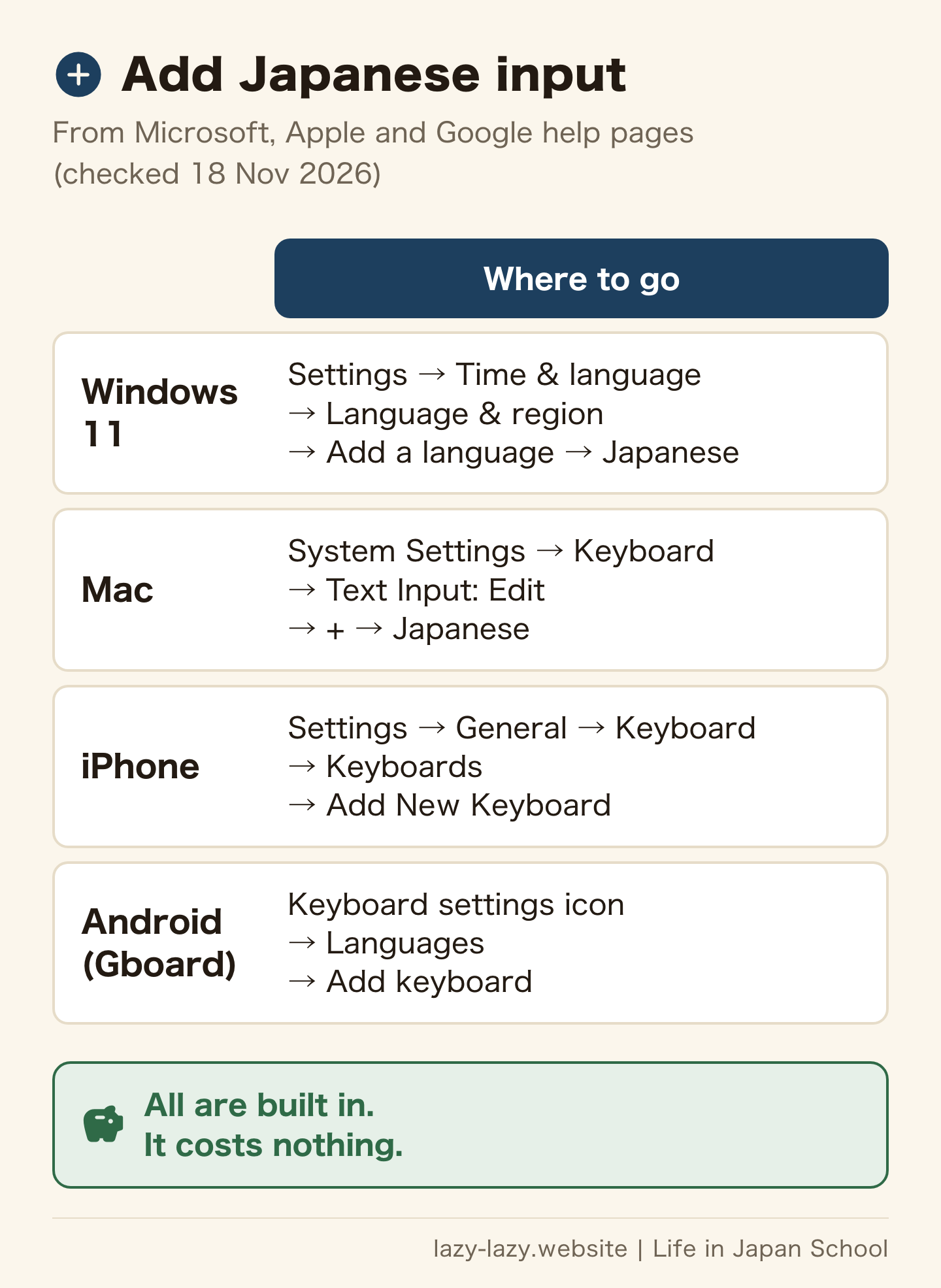
- Windows 11: go to Settings, then Time & language, then Language & region. Next to Preferred languages, choose Add a language. Pick Japanese and install it (Microsoft: manage language and keyboard settings).
- Mac: go to System Settings, then Keyboard. Under Text Input, click Edit. Click the add button and choose Japanese. You can pick Japanese – Romaji or Japanese – Kana (Apple: set up a Japanese input source).
- iPhone: go to Settings, General, Keyboard, Keyboards. Tap Add New Keyboard and choose Japanese (Apple: add or change keyboards on iPhone).
- Android: in Gboard, tap the settings icon above the keyboard. Tap Languages, then Add keyboard. Choose Japanese and a layout (Gboard Help: type in another language).
Romaji input means you type Japanese sounds with English letters. Apple says romaji input is handy if you do not use a Japanese keyboard. If you grew up typing in English, choose romaji. Your fingers keep the same habits. Not bought a laptop yet? First decide on the keyboard layout, JIS or US, before you buy.
How to type Japanese on an English keyboard: switch with Alt + `
After you add Japanese, you need to switch to it. The key depends on your device and keyboard.
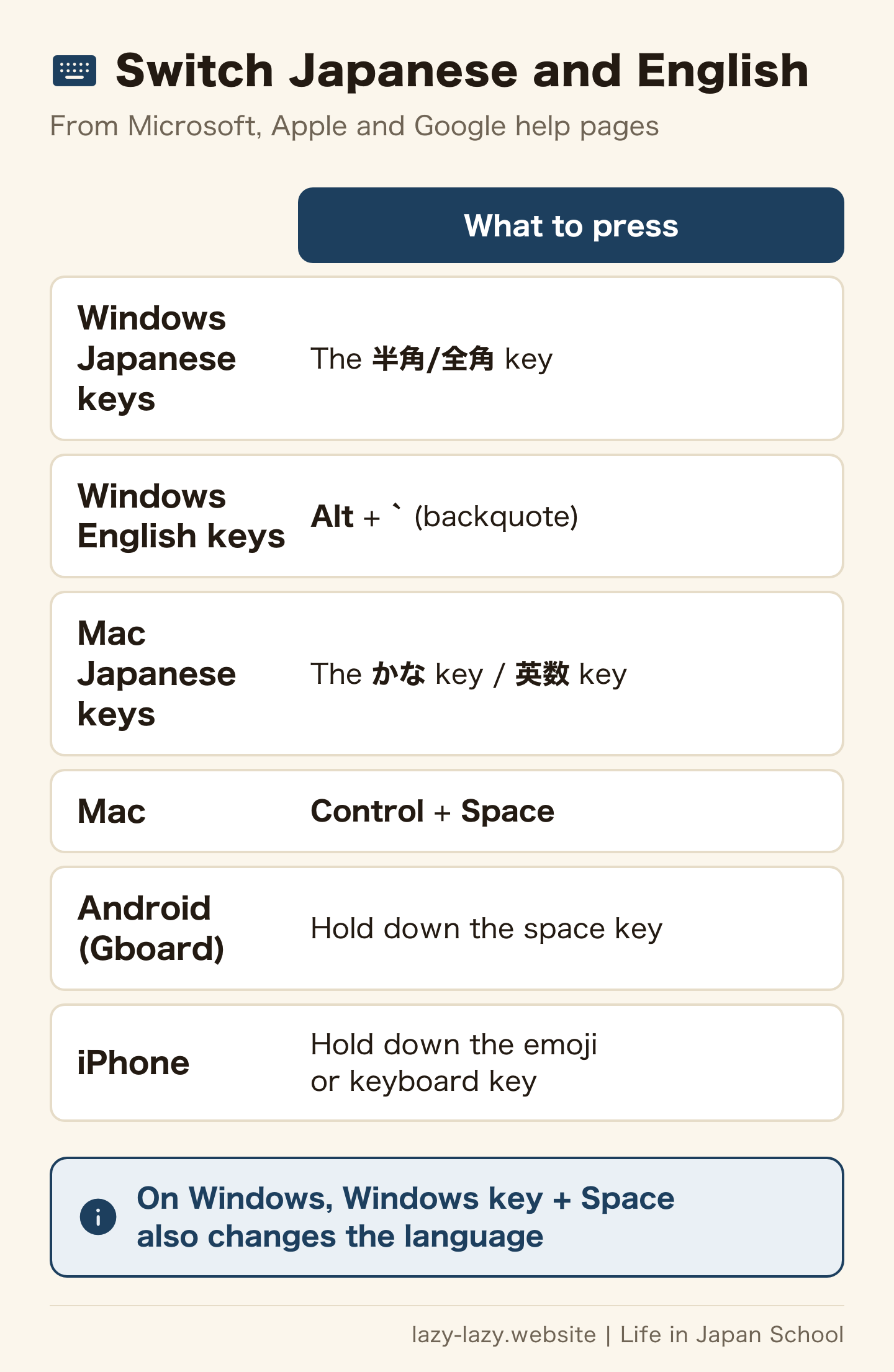
On Windows with a Japanese keyboard, the 半角/全角 key turns Japanese input on and off. Alt + ` (the backquote key) also turns it on and off (Microsoft: Microsoft Japanese IME). It works on any keyboard, so use it if your English keyboard has no 半角/全角 key. Windows key + Space also changes the language.
On a Mac with a Japanese keyboard, the かな key gives Japanese and the 英数 key gives English. On any Mac, Control + Space goes back to the last input source you used (Apple: switch to a Japanese input source).
On Android with Gboard, hold down the space key. On iPhone, hold down the emoji button or the keyboard key, then pick a keyboard.
How to type small tsu, ん and other tricky romaji
Romaji input is close to the romaji you may know. But a few sounds have fixed spellings. This table comes from the Apple romaji and kana table.
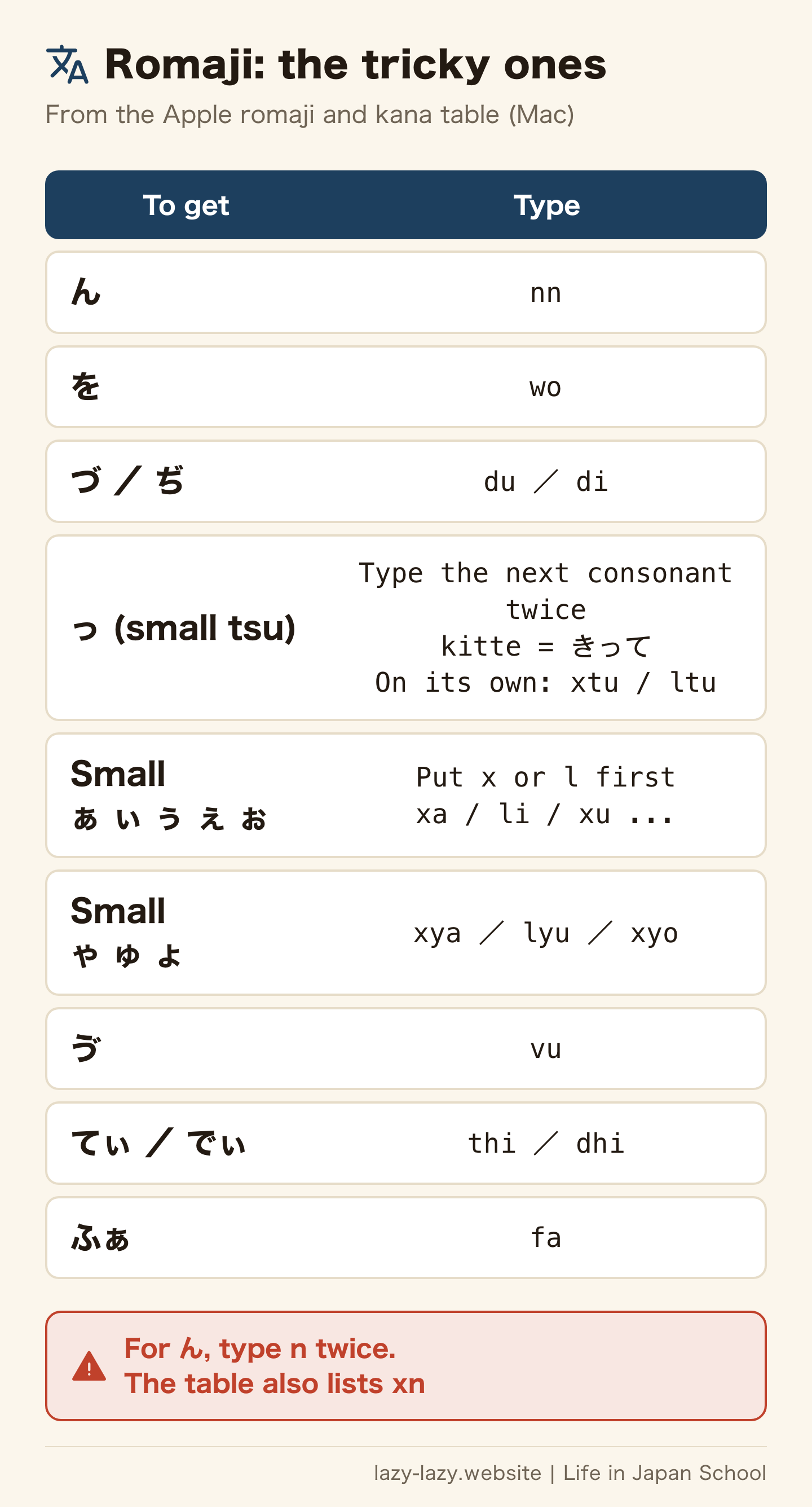
- ん: type nn. The table also lists xn.
- を: type wo. Just o gives お.
- づ and ぢ: type du and di. Typing zu or ji gives ず or じ.
- Small っ: type the next consonant twice. For きって, type kitte. To get っ alone, type xtu or ltu.
- Small ぁ, ゃ and others: put x or l first, as in xa or lya.
- Sounds common in foreign names: ゔ = vu, てぃ = thi, でぃ = dhi, ふぁ = fa.
This table is for Mac. On Windows, if one spelling does not work, try another one from the table.
How to type katakana: F7 on Windows
If a form wants your name in katakana, type it in hiragana first. Before you confirm it, press one of these keys on Windows (Microsoft: Microsoft Japanese IME).
| Key | Changes it to |
|---|---|
| F6 | Hiragana |
| F7 | Full-width katakana |
| F8 | Half-width katakana |
| F9 | Full-width letters and numbers |
| F10 | Half-width letters and numbers |
On a Mac, Control + K or F7 gives katakana. Control + J or F6 gives hiragana. Control + L or F9 gives full-width letters. On some Macs you also need to hold the Fn key (Apple: keyboard shortcuts for Japanese).
On Android with Gboard, each tap on the あa1 key switches the keyboard. It goes from hiragana to letters to numbers (Android site: what is Gboard, in Japanese).
Full-width katakana and half-width: what forms mean
You type your name in English letters, and the form will not let you go on. Where you come from, that may be normal. In Japan, a form can set a character type for each box.
Full-width (全角) letters are as wide as kanji and kana. Half-width (半角) letters are half that width. They may look alike, but the computer treats them as different letters. If the box has a note next to it, follow that note.
Here is a real example from an input form on the My Number Portal, a government site.
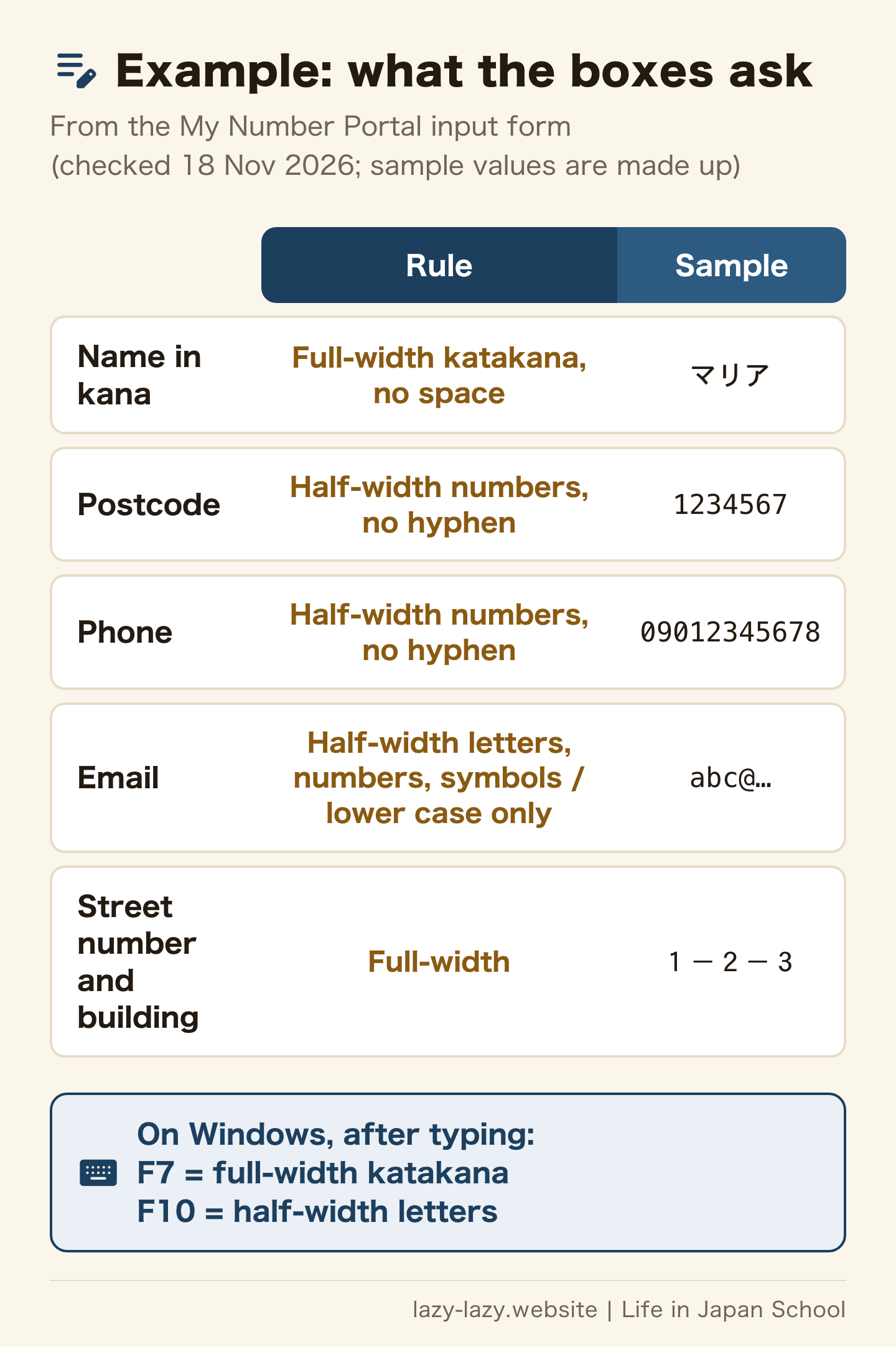
- Name in kana: full-width katakana, with no space
- Postcode and phone number: half-width numbers, with no hyphen
- Email: half-width letters, numbers and symbols, in lower case only
- Street number and building name: full-width
So the postcode is half-width, but the street number is full-width. Read the small note next to each box first. To write the street number with hyphens, see how to write a Japanese address. Password boxes are almost always half-width. To make a strong one, read our passwords and 2FA guide.
Flick input on a Japanese phone keyboard
Flick input is a way to type on the 12-key phone keyboard. Each key holds five kana.
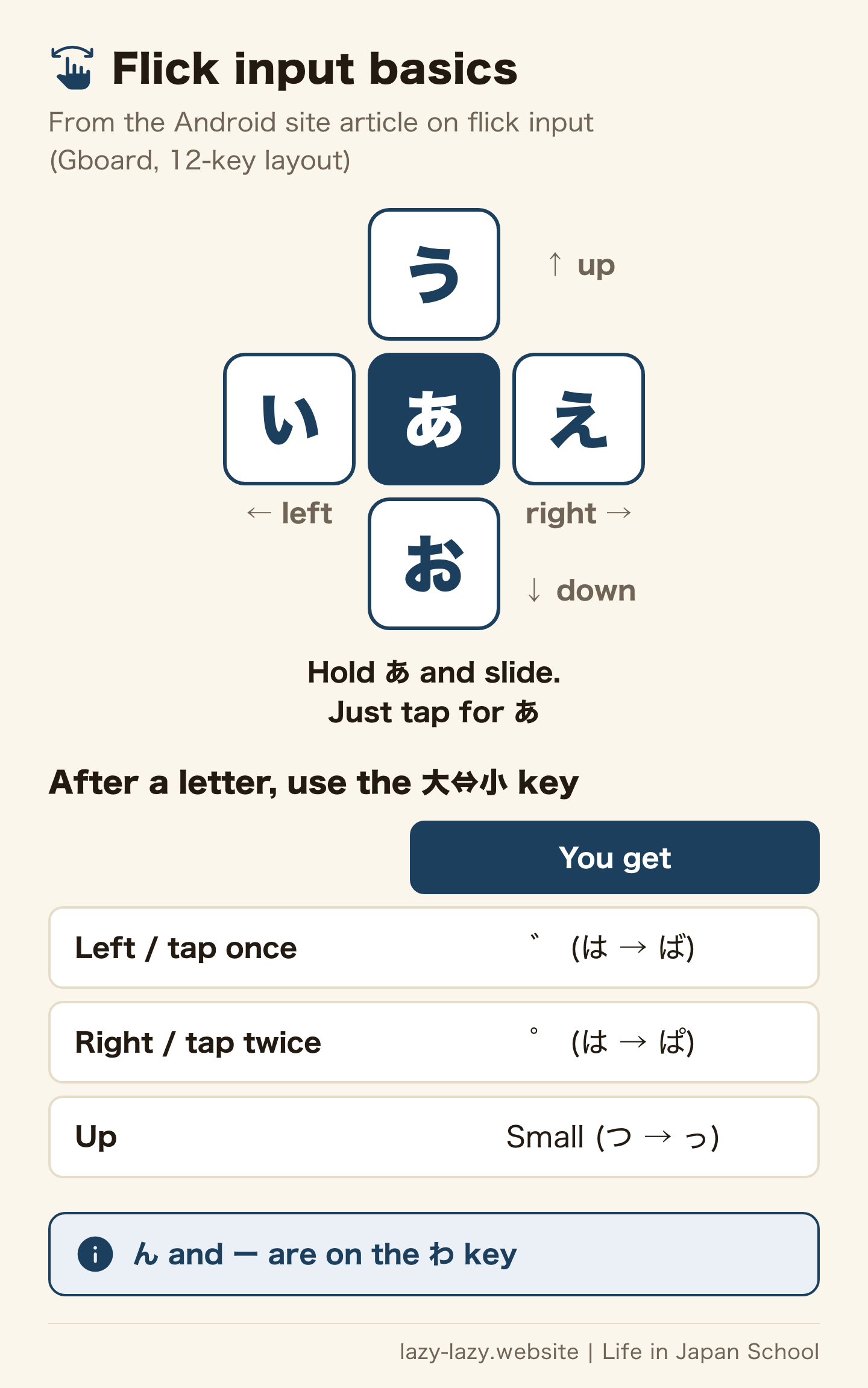
The Android site explains it like this. あ sits in the middle. Slide left for い, up for う, right for え and down for お. On the か key, slide down for こ (Android site: flick input, in Japanese).
- ば: type は, then slide the 大⇔小 key at the bottom left to the left, or tap it once
- ぱ: slide the same key to the right, or tap it twice
- Small っ or ゃ: slide the same key up
- ん: slide up from the わ key. The long vowel ー is on the わ key too
You can also tap a key many times to change the kana. In Gboard, turn on Flick only in the 12-key settings. Then typing the same kana twice gets easier. The iPhone also has Japanese keyboards for kana and for romaji. To use romaji on Gboard, choose the QWERTY layout (Android site: Gboard layouts, in Japanese).
Tired of typing your name and address? Save them as shortcuts
A long katakana name or a full address is easy to mistype. Save it once. Then a short reading brings it up as a suggestion.
- Windows: right-click the IME icon on the taskbar and choose Add Word (Microsoft: advanced input methods for East Asian languages)
- iPhone: hold the emoji or keyboard key, open Keyboard Settings, then Text Replacement. Tap add. Enter the word as the Phrase and its reading as the Shortcut. On a Japanese iPhone, this menu is ユーザ辞書 (Apple: set up shorthand on iPhone)
- Android with Gboard: open Settings, then Dictionary (単語リスト on a Japanese phone). Then follow the screen to add a word (Gboard Help)
Use the same katakana for your name that your bank account already uses. If each form shows a different spelling, matching them later gets hard. For an example with a payment app, see how PayPay wants your name.
How much does it cost? Nothing
Japanese input comes with Windows, Mac, iPhone and Android. Adding it, switching and saving shortcuts are all free. You do not need a laptop with a Japanese keyboard. With an English keyboard, romaji input and Alt + ` are enough.
What if you use the wrong type of letter?
If a box has the wrong type of letter, the form may show an error and stop you. Some letters are not allowed at all, even with no note on the box.
- The My Number Portal contact form asks you not to use half-width katakana. It also bans device-specific symbols, like circled numbers and unit signs (My Number Portal contact form, in Japanese).
- In the online moving service, a kanji that the system cannot use gives an error message. Replace it with a usable one. For example, use 浜 for 濵 (My Number Portal FAQ, in Japanese).
- Some boxes also fix upper or lower case. The signature password on the My Number Card takes capital letters only (My Number Portal FAQ, in Japanese).
Immigration forms can go online now too. See online visa renewal in Japan for the steps.
Japanese input stopped working and types English letters
Japanese input may not have gone away. The input mode may just be set to English letters. Try these steps in order.
- On Windows, press 半角/全角 or Alt + ` once.
- On a Japanese keyboard, check the 英数 (Caps Lock) key. It switches hiragana and English letters.
- Right-click the IME icon on the taskbar. Set the input mode to Hiragana.
- Press Windows key + Space, or Control + Space on a Mac. Check that Japanese is chosen.
- If Japanese is not in the list, add it again with the first steps above.
Once it works, practise with your own name, address and phone number. You type these three on almost every form. For work emails, see Japanese job interview phrases and email templates. For a resume made on a computer, use the free rirekisho template.
Which one are you?
- Your computer has no Japanese yet. Add it with the first steps and choose romaji. Today, type your name in katakana once.
- You cannot switch on an English keyboard. Learn Alt + ` (Control + Space on a Mac). Today, switch back and forth three times in a notes app.
- A form asked for 全角カナ or 半角英数. Read the note by the box. Fix it with F7 for katakana or F10 for half-width. Today, finish that form.
- You type slowly on your phone. In Gboard, turn on Flick only. Today, save your name and address as shortcuts.
FAQ
Q. Does adding Japanese input cost money?
No. Windows, Mac, iPhone and Android all let you add Japanese in the settings for free.
Q. Can I type Japanese on an English keyboard?
Yes. Choose romaji input. On Windows, press Alt + ` (backquote) to switch. On a Mac, press Control + Space.
Q. How do I type ん in romaji?
Type nn. The Apple table also lists xn.
Q. How do I type a small tsu (っ)?
Type the next consonant twice. For きって, type kitte. To get っ alone, type xtu or ltu.
Q. What is full-width katakana?
It is katakana as wide as kanji and kana. On Windows, type the word in hiragana, then press F7.
Q. How do I add ゛ or make small kana with flick input?
Type the kana, then use the 大⇔小 key at the bottom left. In Gboard, slide left or tap once for ゛. Slide right or tap twice for ゜. Slide up for small kana.
Summary
Japanese input is free and already on your device. Add Japanese in the settings. On an English keyboard, switch with Alt + ` on Windows or Control + Space on a Mac. The tricky romaji are ん (nn), を (wo), づ (du), small kana (x or l) and small っ (double the consonant).
Forms usually stop you because of full-width and half-width. Read the note by each box. On Windows, fix it with F7 or F10. On a phone, hold a key and slide it. Save your name and address as shortcuts, and you will make fewer typos.
Official sources: Microsoft: Microsoft Japanese IME / Microsoft: manage language and keyboard settings / Microsoft: advanced input methods for East Asian languages / Apple: set up a Japanese input source / Apple: switch to a Japanese input source / Apple: keyboard shortcuts for Japanese / Apple: romaji and kana table / Apple: add or change keyboards on iPhone / Gboard Help: type in another language / Android site: flick input (Japanese) / My Number Portal input form (Japanese)
Related guides
Found this useful? Share it
Send it to a friend who lives in Japan.
WHO WROTE THIS

mori
Japanese. I read the ministries’ own notices, orders and Q&As in the original, and I start from what my Nepalese and Sri Lankan friends in Japan actually ran into. I do not write about what I have not checked or been told.
What this site can and cannot do →Looking for something else?
You may use the figures in this article, including commercially, if you credit this site with a link. How to use our figures