Checked on 23 September 2026 against the Immigration Services Agency’s pages on online residence procedures, its online Q&A, and the start-up guide and user manual for foreign nationals. Fees and payment were re-checked on 1 October 2026 against its page on fees and payment for online applications and its convenience store payment steps. On 18 October 2026 the fee page was opened again, and the amounts and ways to pay had not changed.
The short answer
- The Online Residence Application System lets you renew your visa (extend your period of stay) or change your status from a computer, without going to Immigration. It is open 24 hours a day and free to use.
- To use it yourself, you need a My Number card. You scan the card with the Mynaportal app on a smartphone and fill in the application on a computer.
- You can file from three months before expiry up to the day before. On the expiry date itself, or after it, only the counter will take you. Filing from three months before applies to people with a period of stay of six months or longer.
- From 1 October 2026, applying online costs up to 9,450 yen less than the counter. You pay at a convenience store or by bank payment, and the payment notice only ever comes from “@service-dgft.com”.
- If you want your new residence card quickly, choose to collect it at the counter. Immigration itself says delivery by post is taking time.
Knowing this, you can file your renewal without taking a weekday off, and prove you are still legal with one email if your card expires while you wait. You will also know a fake payment email when you see one.
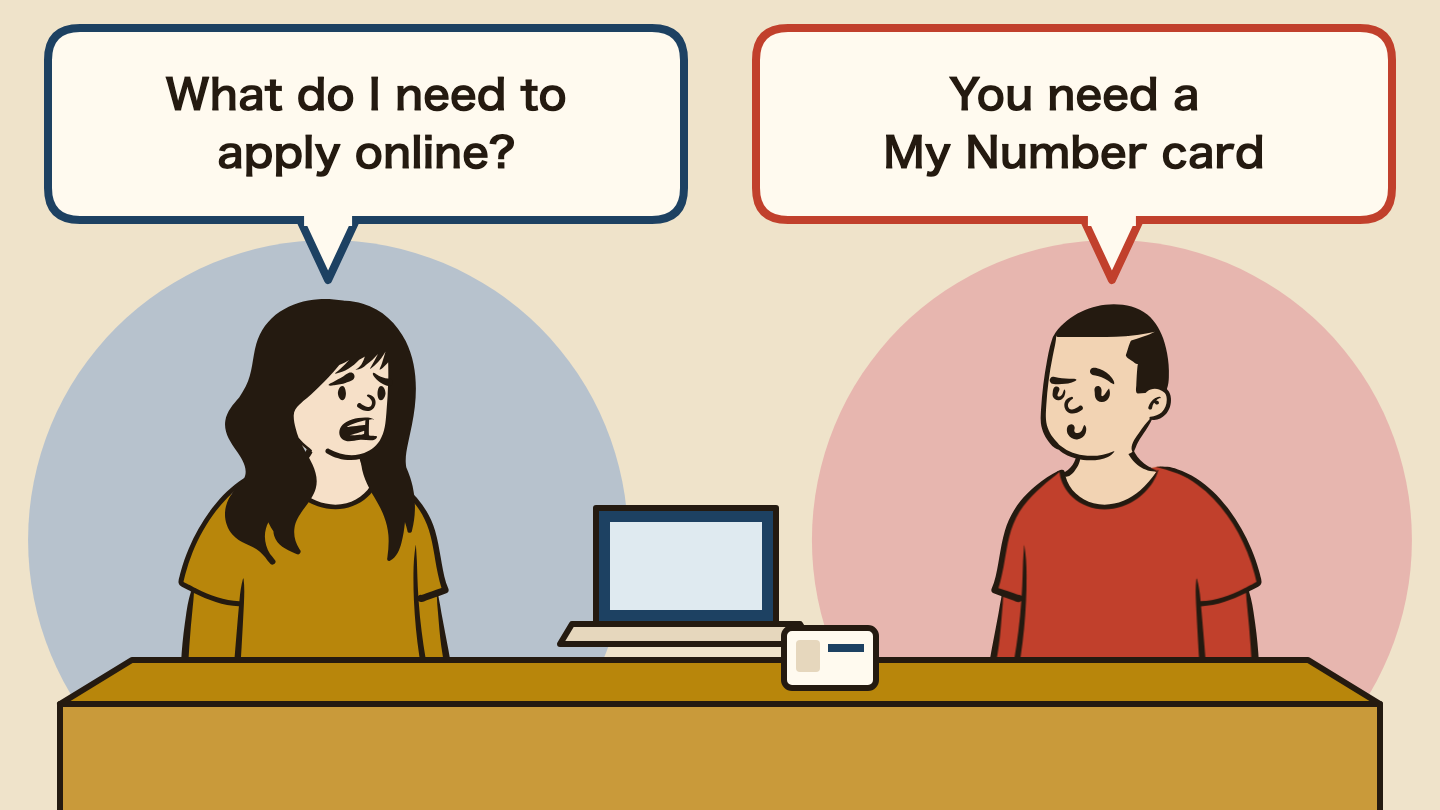
Your residence card runs out in two months. Immigration is only open on weekdays, and people say you queue for half a day. Do you skip a shift, or skip class? You ask a Japanese friend whether you can do it from home. They have no idea. Japanese people never renew a visa. The answer is yes, if you have a My Number card.
- Online visa renewal at a glance: numbers, deadlines and contacts (October 2026)
- What is online visa renewal in Japan? The Immigration system for filing from home
- Who can apply online? You, if you have a My Number card
- What can you do online, and what can’t you?
- When can I renew my visa online? From three months before, but not on the expiry date
- How to apply online: four things to prepare and three steps
- What emails will I get after applying? Never delete the acceptance number email
- How much is the online visa renewal fee? Up to 9,450 yen less than the counter from 1 October
- Collecting the new residence card: post or counter? Choose the counter if you need it soon
- Is the fee payment email real? Payment notices come only from “@service-dgft.com”
- What if my visa expires while the online application is pending? A grace period of up to two months, proved by the acceptance number email
- What if I missed the date or something goes wrong? On the expiry date or after it, go to the counter
- Which one are you?
- FAQ
- Summary
- Related reading
Online visa renewal at a glance: numbers, deadlines and contacts (October 2026)
| What you want to know | Answer |
|---|---|
| Who can use it | Mid- to long-term residents aged 15 or older (for a child under 16, a legal representative can apply). A My Number card is required |
| When you can file | From three months before expiry (if your period of stay is six months or longer) up to the day before expiry |
| When you cannot file | On the expiry date and after it (go to the counter). On the day you file a moving-in notification. During maintenance. From abroad |
| Fee (accepted by 30 September) | 5,500 yen online (revenue stamps). 6,000 yen at the counter (ISA, Extension of period of stay) |
| Fee (accepted from 1 October) | For one year, 33,000 yen at the counter and 27,330 yen online. All bands are in the fee table below |
| How to pay | Convenience store or bank (Pay-easy). No credit cards, QR codes or revenue stamps. Pay by the day before you collect your card |
| The real payment notice | From “@service-dgft.com”, after the examination-completed email. Payment application and completion emails come from “@veritrans.jp” |
| Emails after you apply | Three: straight away, about 10 minutes later and the next day. Keep the next-day acceptance number email (info@rasens-immi.moj.go.jp; ISA, how to confirm the grace period) |
| If your stay expires while you wait | You can stay until the decision or two months after expiry, whichever comes first. Proof: your residence card plus the acceptance number email |
| To get the card quickly | Choose collection at the counter. Once the examination-completed email arrives, you cannot switch from post |
| Help with the system | Helpdesk 050-3786-3053 (weekdays 9 am to 5 pm) |
| Questions on postal collection | Odaiba branch, Tokyo Regional Immigration Services Bureau, 03-3599-1068 |
| If you get a suspicious email | Police consultation line #9110, consumer hotline 188 |
What is online visa renewal in Japan? The Immigration system for filing from home
The Online Residence Application System is the Immigration Services Agency’s website for filing residence applications, including extending your period of stay (what most people call visa renewal) and changing your status of residence. A new version went live on 5 January 2026, and it now lets you save a half-finished application.
You do not have to visit an immigration office, and applications are accepted 24 hours a day, 365 days a year.
It does not work from abroad. Access from overseas IP addresses is blocked, so you cannot file from home while you are on a trip back to your country.
Who can apply online? You, if you have a My Number card
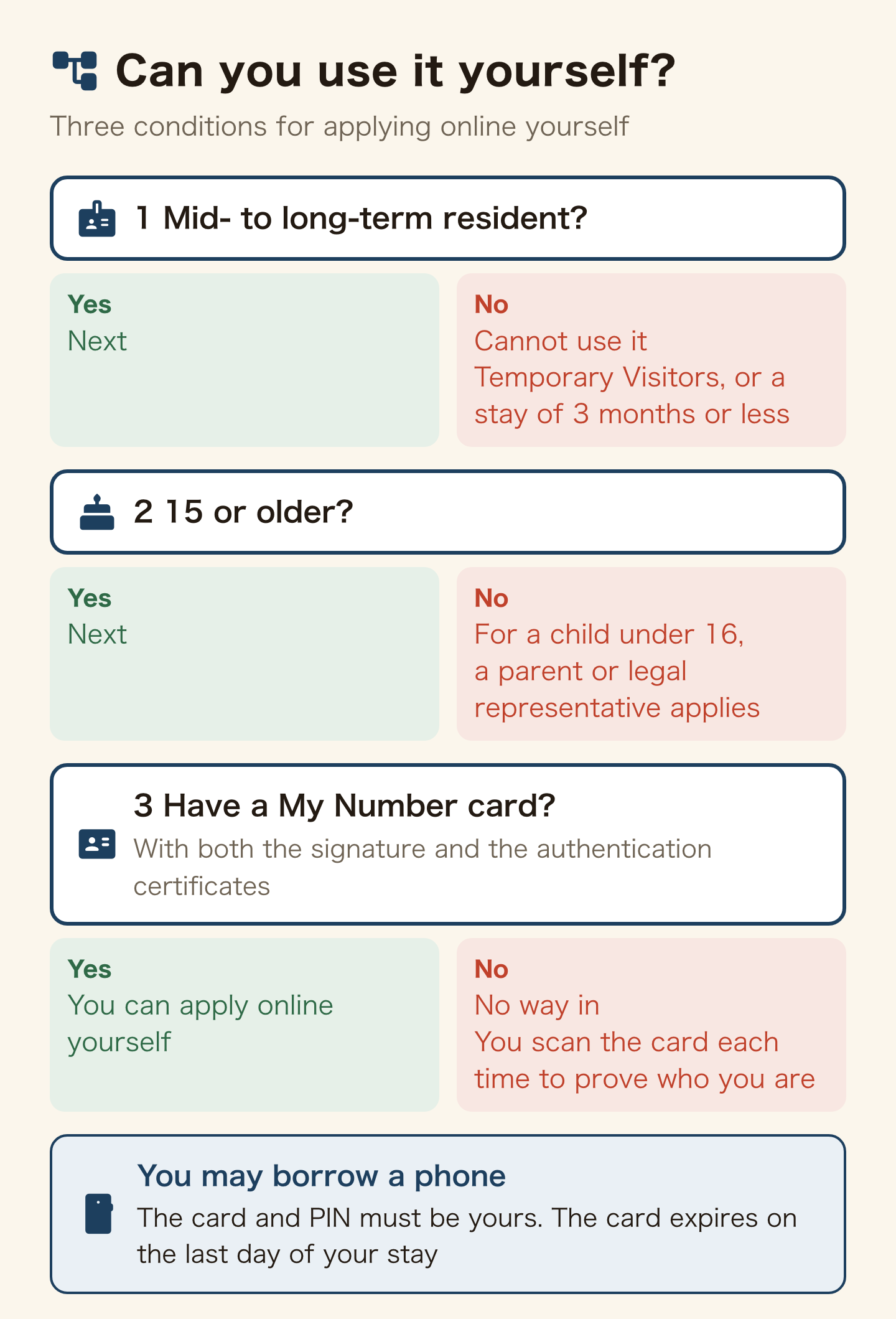
You can use it yourself if three things are true.
- You are a mid- to long-term resident. Temporary Visitors and people with a period of stay of three months or less cannot use it
- You are 15 or older. For a child under 16, a parent or other legal representative can apply
- You have a My Number card carrying both electronic certificates: the signature certificate and the user authentication certificate
Without the card there is no way in, because you prove who you are by scanning it with the Mynaportal app. If your own phone cannot read the card, you may borrow a family member’s phone. The card and PIN must still be yours.
Watch the card’s expiry. A foreign resident’s My Number card expires on the last day of your period of stay, and your user ID for the system only lasts as long as the card’s electronic certificate. After you extend the card, you file the request for use again. How to extend the card is in the My Number card guide for foreign residents.
What can you do online, and what can’t you?
On your own, you can file these:
- Extension of period of stay (visa renewal)
- Change of status of residence (Student to a work status, for example)
- Acquisition of status (for a baby born in Japan, the parent files as legal representative)
- Certificate of authorized employment
- Re-entry permit and permission to work outside your status, but only together with an extension, change or acquisition
If you only want the part-time work permission on its own, you go to the counter.
Some things cannot be done online at all: permanent residence, renewing the residence card itself, and changes to the card’s details other than your address. The new Special Residence Card, which combines the residence card and My Number card, also cannot be applied for online for now.
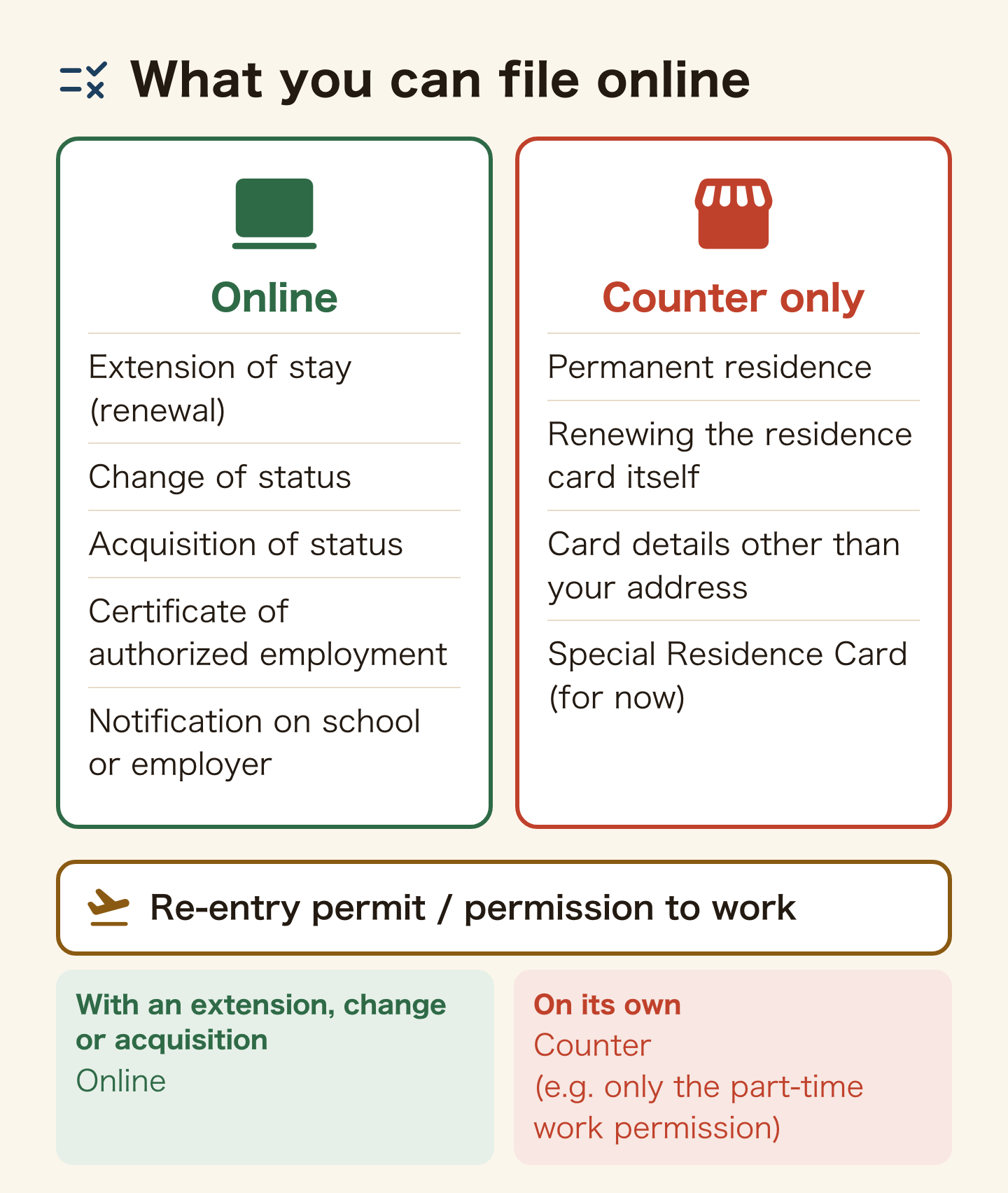
On the other hand, notifications about your school or employer, such as when you leave one, can be filed through the same system.
When can I renew my visa online? From three months before, but not on the expiry date
If your period of stay is six months or longer, you can apply for an extension from three months before it expires. A change of status can be filed from the moment the reason for the change arises until expiry. These rules are the same online and at the counter.
One rule is online-only. You cannot apply online on the expiry date itself. Open your laptop on the last day and the system will not take you; that day you go to the immigration office for your area (ISA, online residence procedures).
There are other blocked days. You cannot file on the day you submit a moving-in notification at the city office; wait until the next day. The system also stops for maintenance.
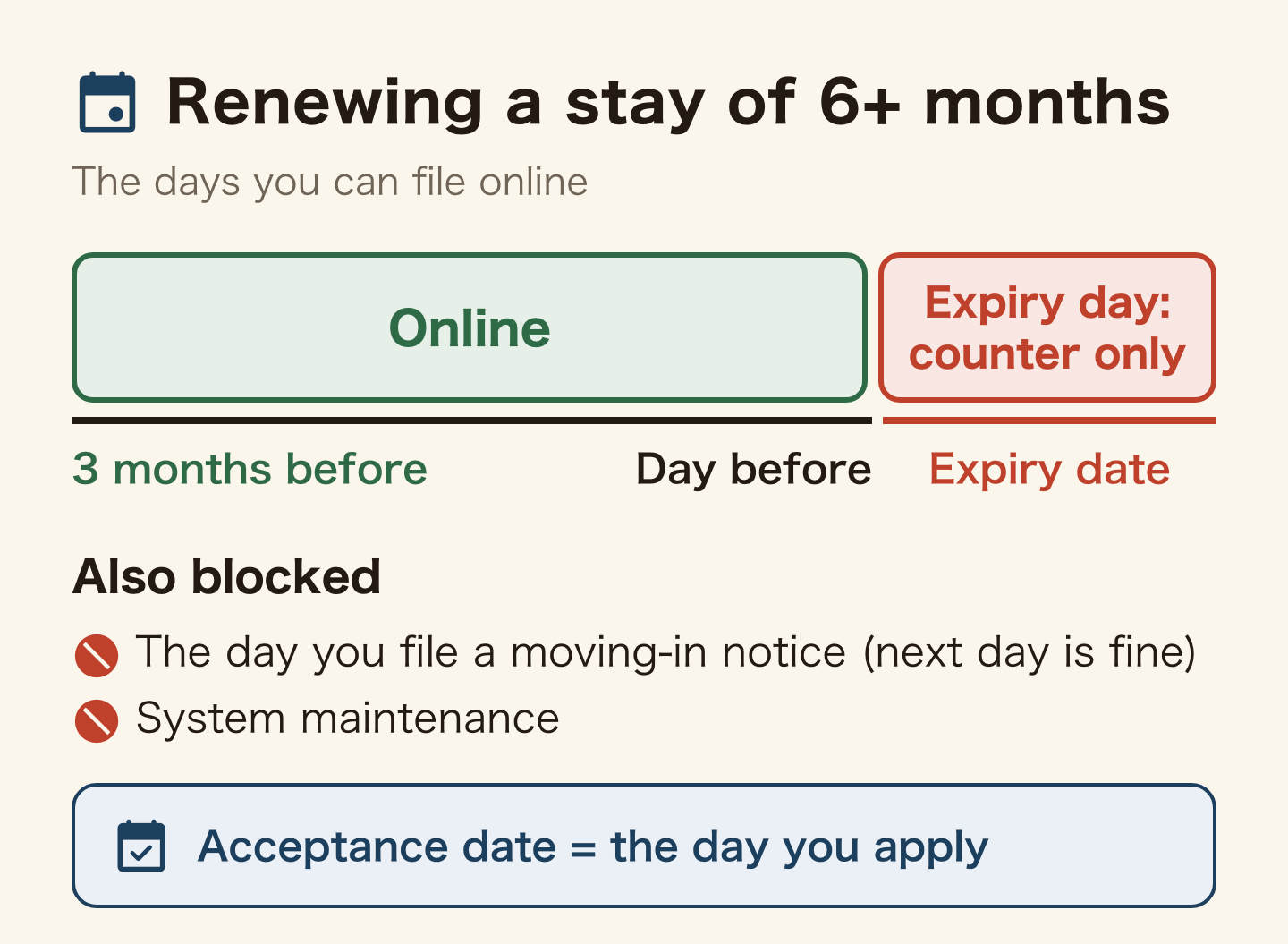
Your acceptance date is the day you apply online. That date decides whether you pay the old fee: applications accepted by 30 September pay it even if permission comes on or after 1 October (ISA, fee revision of 1 October 2026 (Japanese)).
How to apply online: four things to prepare and three steps
You need four things:
- A My Number card with both electronic certificates
- A smartphone with the Mynaportal app (to read the card)
- A computer (Windows or macOS; Edge recommended, Chrome and Safari also work)
- An email address set to receive mail from “@rasens-immi.moj.go.jp”
You cannot do it on a phone alone. Immigration does not guarantee the system works in a phone or tablet browser; the phone is only for reading the card. Immigration also says free webmail addresses often miss the notices and recommends an address from a Japanese provider.
Then three steps:
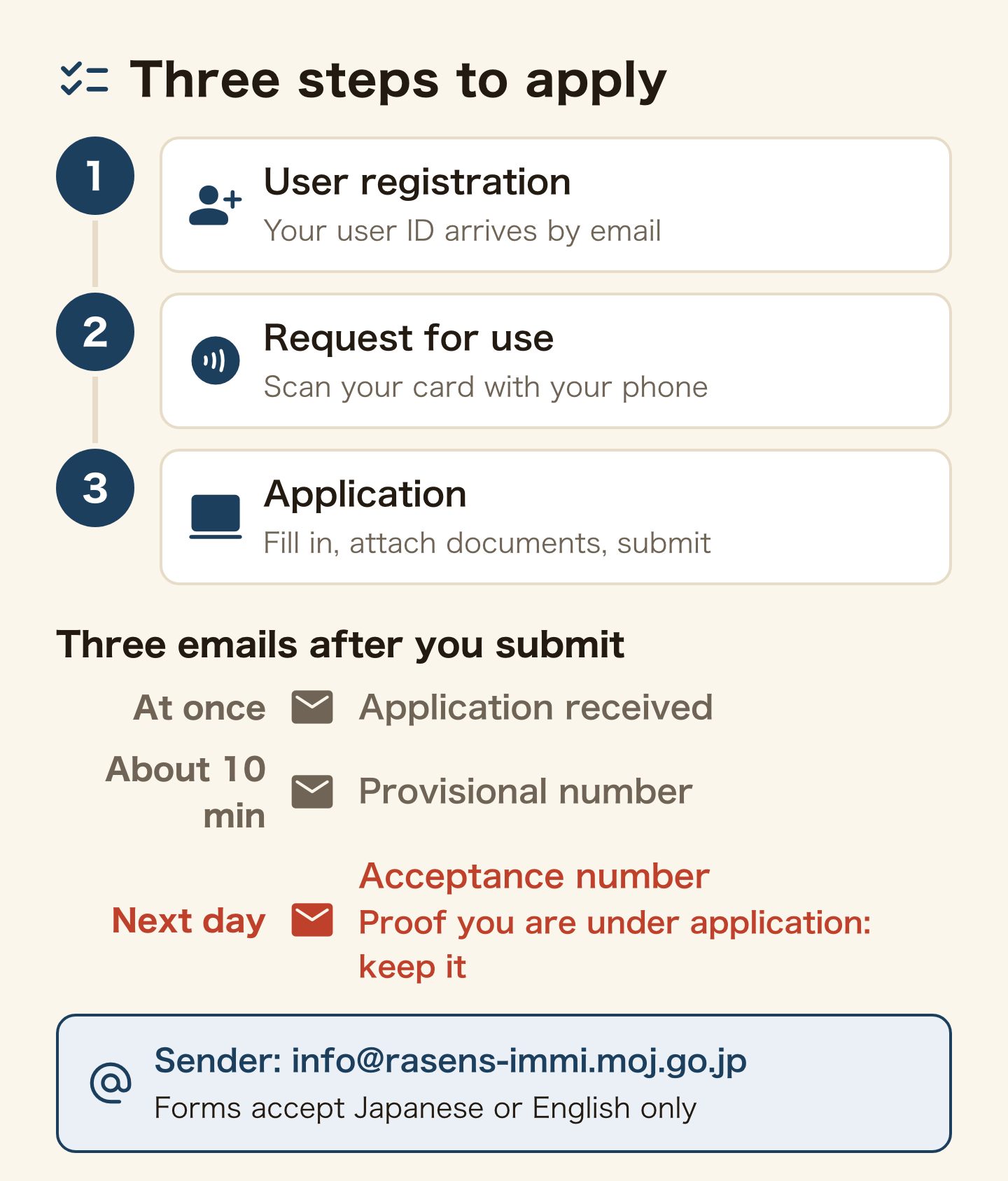
- User registration (ISA, for foreign nationals and family members): enter your email, open the link you receive within 24 hours, choose “foreign national” as the user type, and your user ID arrives by email
- Request for use: log in and scan your My Number card with your phone. If nothing is wrong, a completion email arrives within minutes
- Application: choose the procedure, fill in the form, attach your photo and documents, and submit
The form can be filled in Japanese or English, and no other language.
Documents go in as PDFs
You submit the same documents as at the counter; the list for your status is in the visa renewal guide. Online, they go in as PDF files instead of paper.
- Up to 20 files at a time, 25 MB in total including the photo
- Clear scans, around 200 dpi or better
- Password-protected or print-locked PDFs are treated as errors, with no error message shown
For 22 statuses, including Student, Engineer/Specialist in Humanities/International Services, Dependent and Specified Skilled Worker, you also attach the form filled in by your school, employer or sponsor. Even when you apply yourself, they have to fill in that page.
You do not need to fetch a resident tax certificate from city hall. When you apply yourself, the system can pull your income and resident tax information from Mynaportal and attach it.
What emails will I get after applying? Never delete the acceptance number email
Three emails arrive after you submit (ISA online application Q&A):
- Application received (straight away)
- Provisional application number (about 10 minutes later)
- Application acceptance number (the next day)
The third one matters. Its subject is “【入管庁】申請受付番号のお知らせ” and it comes from “info@rasens-immi.moj.go.jp” (ISA sample in “how to confirm the grace period”). That email is your proof that you are under application. Immigration tells you not to delete it while your application is pending. If it has not arrived after a day, call the helpdesk on 050-3786-3053 (weekdays 9 am to 5 pm).
You can follow progress under [Check Application Status] in the system:
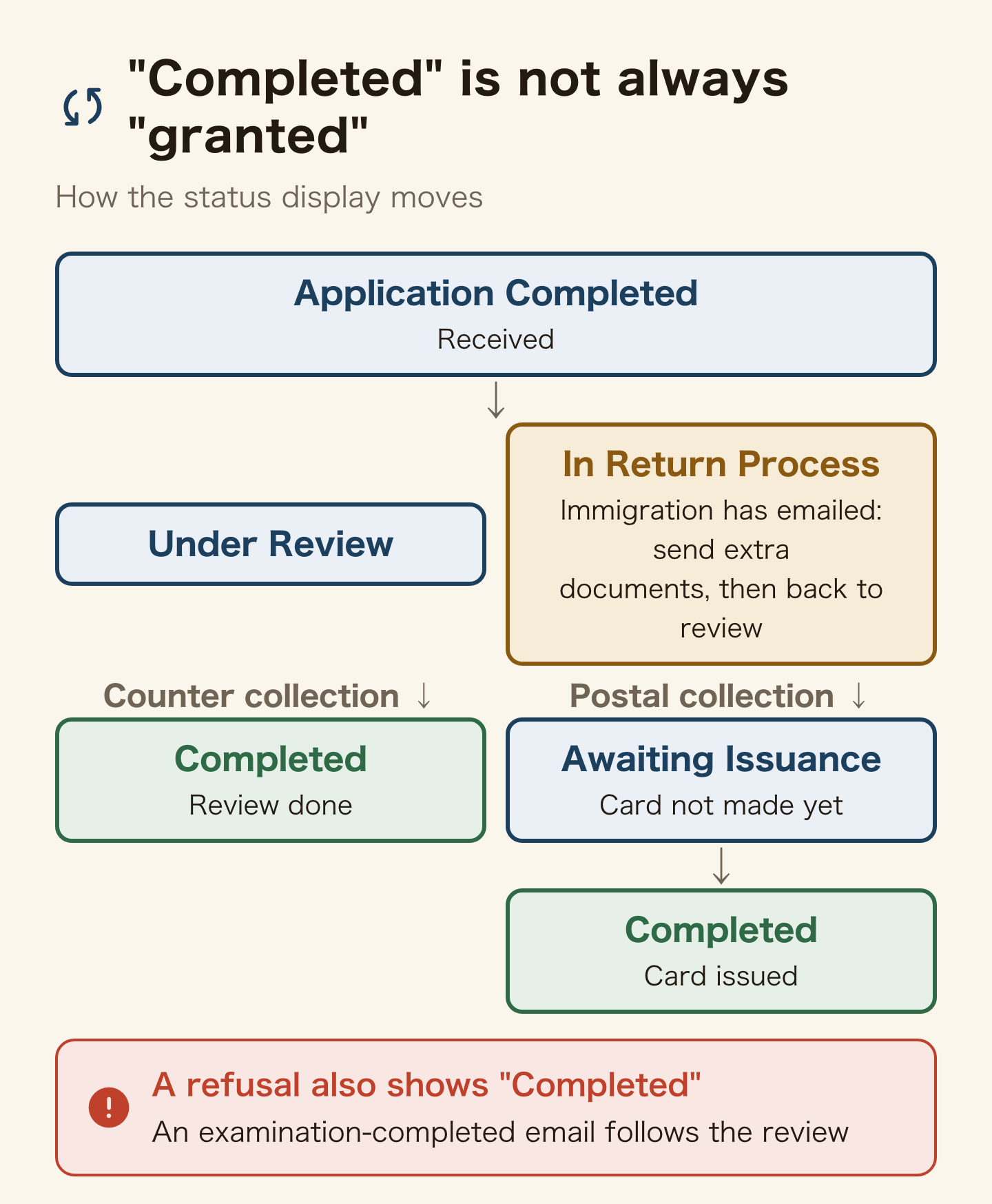
| Status | Meaning |
|---|---|
| Application Completed | Received |
| Under Review | Being reviewed |
| In Return Process | You can submit extra documents (Immigration has emailed you) |
| Awaiting Issuance | Postal collection: review finished, card not yet made |
| Completed | Postal: card issued. Counter: review finished. It also shows “Completed” when the application is refused |
When the review is over, you receive an examination-completed email.
How much is the online visa renewal fee? Up to 9,450 yen less than the counter from 1 October
You pay only when your application is granted, never if it is refused. The amount depends on whether your application was accepted before or after 1 October 2026.
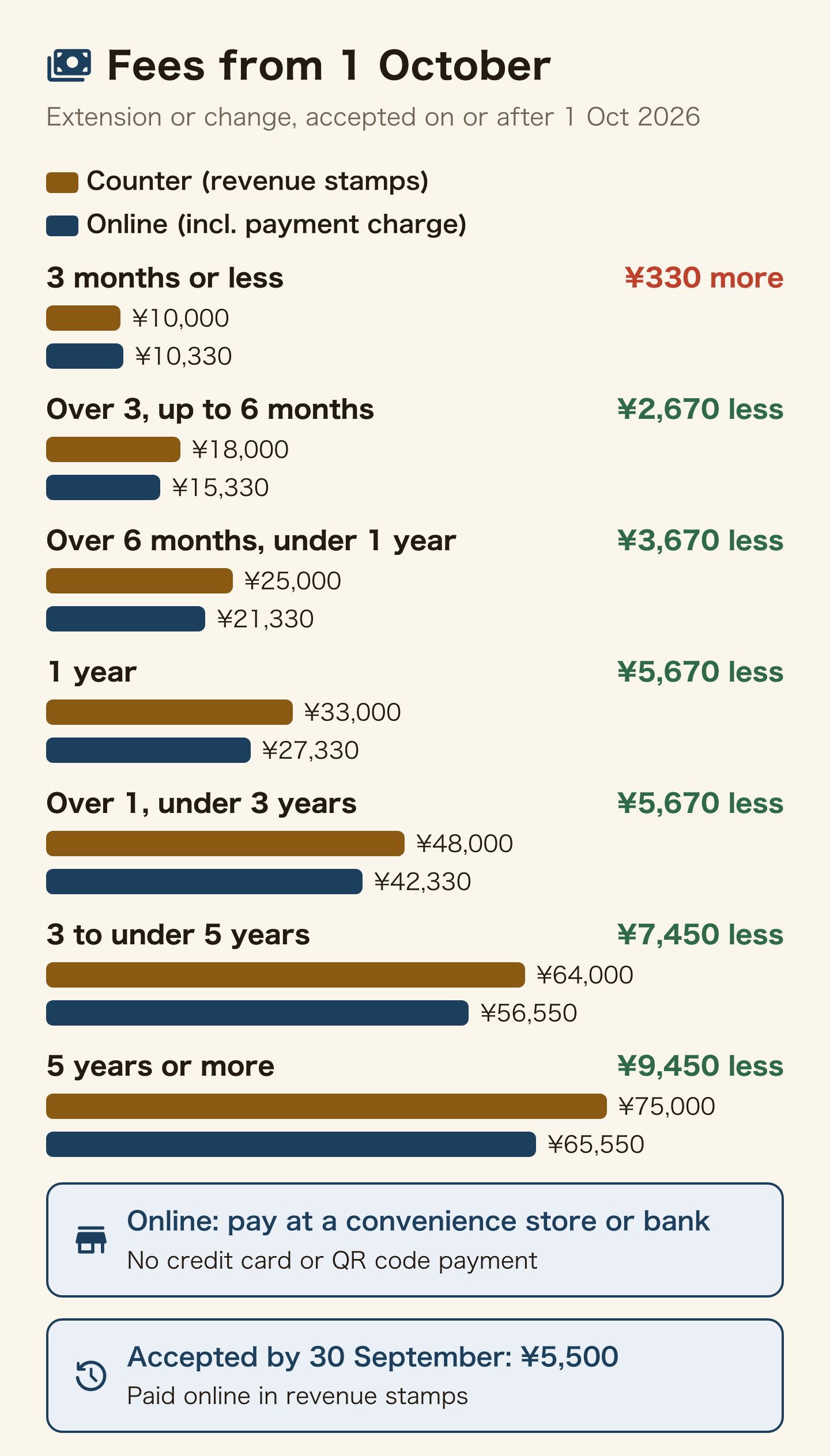
Applications accepted by 30 September pay 5,500 yen for an extension or change (6,000 yen at the counter; ISA, Extension of period of stay), in revenue stamps as before, even if permission comes in October. Your acceptance date is in the email giving your provisional application number or application number.
From 1 October, the fee depends on the period of stay you are granted. Online, a payment charge of 330 or 550 yen is added (ISA, online application fees and how to pay).
| Period granted | Counter | Online (incl. payment charge) | Difference |
|---|---|---|---|
| 3 months or less | 10,000 yen | 10,330 yen | Online 330 yen more |
| Over 3, up to 6 months | 18,000 yen | 15,330 yen | 2,670 yen less |
| Over 6 months, under 1 year | 25,000 yen | 21,330 yen | 3,670 yen less |
| 1 year | 33,000 yen | 27,330 yen | 5,670 yen less |
| Over 1, under 3 years | 48,000 yen | 42,330 yen | 5,670 yen less |
| 3 to under 5 years | 64,000 yen | 56,550 yen | 7,450 yen less |
| 5 years or more | 75,000 yen | 65,550 yen | 9,450 yen less |
You do not choose how long you are granted. The amount to pay is written in the payment email that follows the examination-completed email. The background to the rise and how to read the bands are in the October fee increase.
How you pay changed on 1 October too. For online applications accepted from that date:
- Convenience store payment or bank payment (Pay-easy). Bank payment works at an ATM or through online banking, not at a bank counter
- No credit cards or QR code payments
- Convenience stores listed: Lawson and Ministop, FamilyMart, 7-Eleven, Daily Yamazaki and Seicomart (ISA, convenience store payment steps (Japanese))
- No revenue stamps, and no paper payment slip in the post
- Pay by the day before you collect your residence card. An agent filing for several people cannot pay for them in one go
- Counter applications: revenue stamps, as before
One exception. The fee reduction for people in financial hardship, which started on 1 October 2026, is not available online. To ask for it, apply at the counter.
Collecting the new residence card: post or counter? Choose the counter if you need it soon
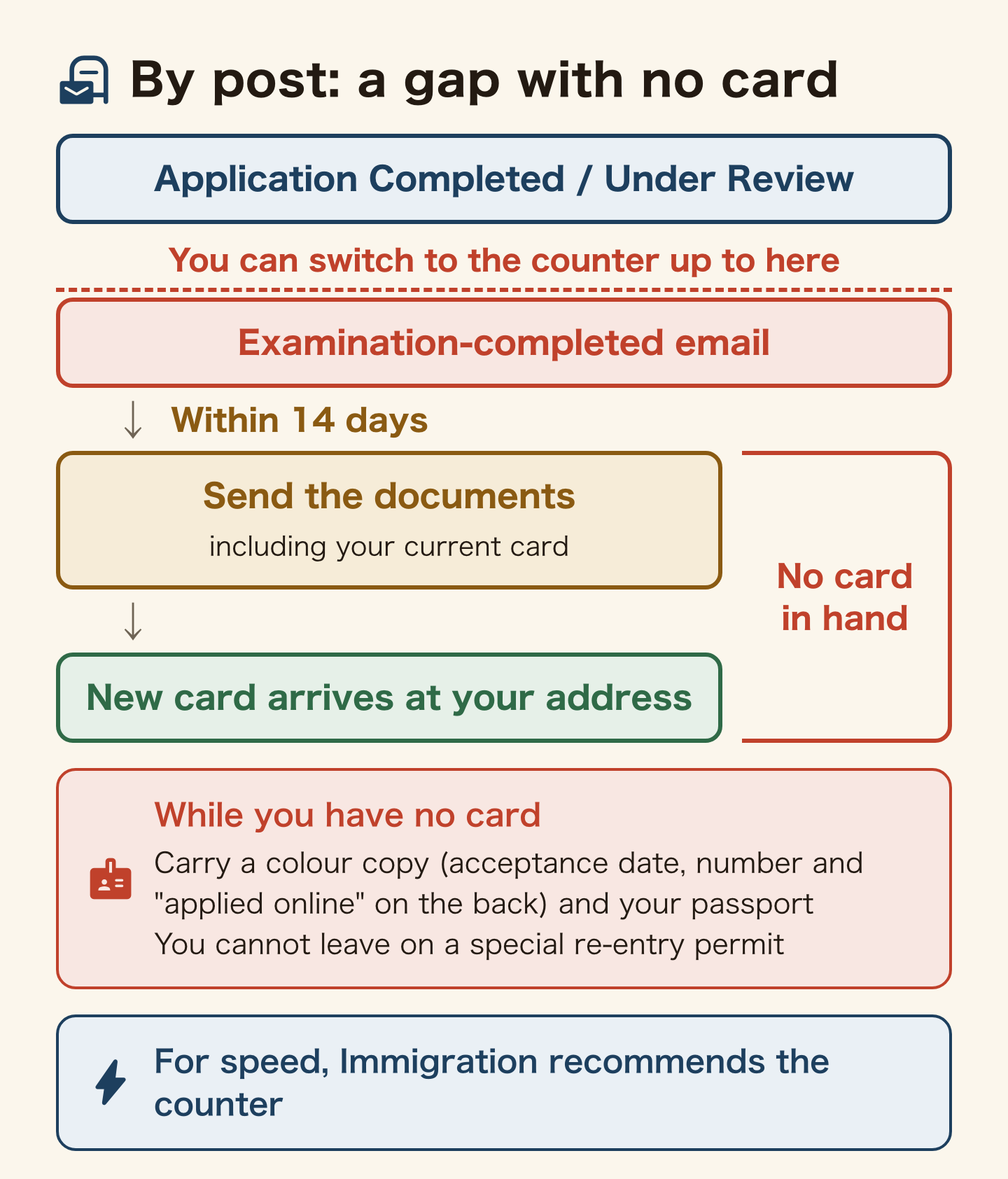
When you are granted, you get the new residence card either by post or at an immigration counter. You choose when you apply, and you can switch while the status shows “Application Completed” or “Under Review”.
Post sounds easier. But Immigration said on 16 September 2026 that postal delivery is taking some time, and it recommends choosing the counter if you want the card quickly. Once the examination-completed email has arrived, you can no longer switch.
By post, it works like this:
- Follow the instructions in the examination-completed email and send the documents by simplified registered mail or Letter Pack to the Odaiba branch of the Tokyo Regional Immigration Services Bureau (if you cannot send them within 14 days, call the Odaiba branch on 03-3599-1068)
- You send a return Letter Pack and your current residence card, among other items. Do not send your My Number card or passport
- The new card arrives at your registered address, and the old one comes back with a hole punched in it
For applications accepted by 30 September, you also enclose the fee form with 5,500 yen in revenue stamps. Revenue stamps are not used for applications accepted from 1 October; you pay by the emailed link before collecting the card, and keep the payment completion email until you have the card. Immigration has not published a separate list of what to enclose (checked 1 October 2026).
Some people cannot choose post: anyone who applied for a re-entry permit at the same time, anyone granted three months or less, anyone adding their name in kanji to the card for the first time, and anyone whose card validity also has to be renewed because their 16th birthday is close.
While you have no card
During postal collection your card is not with you. Carry a colour copy of it, with the application date, the acceptance number and a note that you are applying online written on the back, plus your passport. The carrying rules are in the residence card guide.
Without a card you cannot leave Japan on a special re-entry permit, because holding a valid residence card is a condition. With postal collection, the new permission takes effect when the card is delivered to you. The card comes back in the return Letter Pack you enclose (ISA online application Q&A, Q6-5), so if you were out, request redelivery from the missed delivery notice within the 7-day holding period.
Is the fee payment email real? Payment notices come only from “@service-dgft.com”
From 1 October, the fee for online applications is requested by email from a payment agent designated by Immigration. Immigration states that the notice comes only from “@service-dgft.com”, and any email from another address asking you to pay the fee is a scam.
The real email contains a payment link too, so look at the sender and the order instead:
- Registration, acceptance number and examination-completed emails come from “@rasens-immi.moj.go.jp”
- The payment notice comes after the examination-completed email, from “@service-dgft.com”
- The payment application and completion emails come from “@veritrans.jp”
- A payment request before your review is complete is in the wrong order
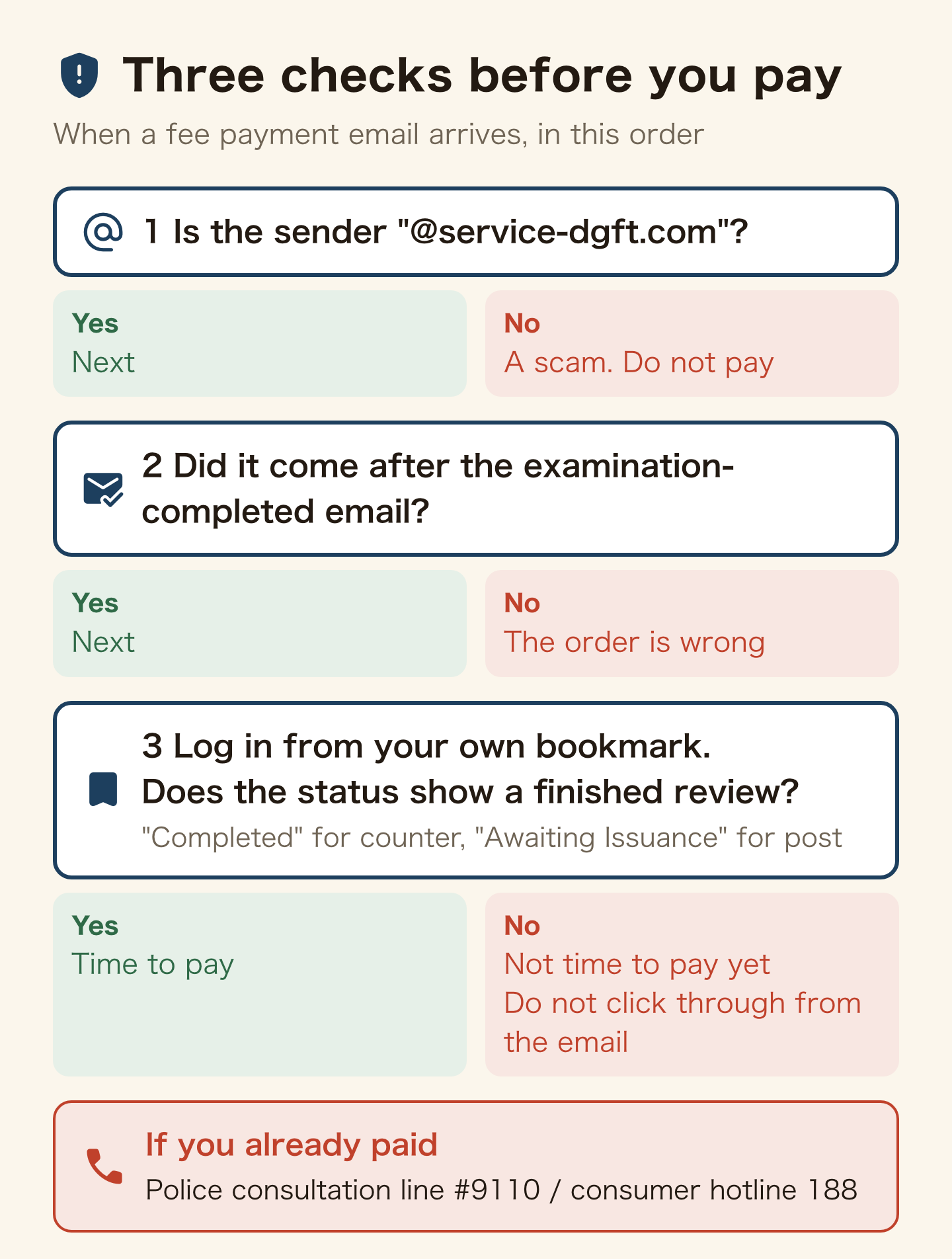
Immigration also warns that scammers can fake real addresses. If in doubt, do not click through. Log in to the system from your own bookmark instead. If the status does not show a finished review (“Completed” for counter collection, “Awaiting Issuance” for post), it is not time to pay. Immigration staff never ask for money by phone or email.
If you have already paid, call the police consultation line #9110 or the consumer hotline 188. The steps to try to get the money back are in scams that target foreigners in Japan.
What if my visa expires while the online application is pending? A grace period of up to two months, proved by the acceptance number email
If you applied before expiry, you do not become illegal the moment the date passes. You can stay on your current status until the decision, or until two months after the expiry date, whichever comes first. This is the grace period (the “special period”).
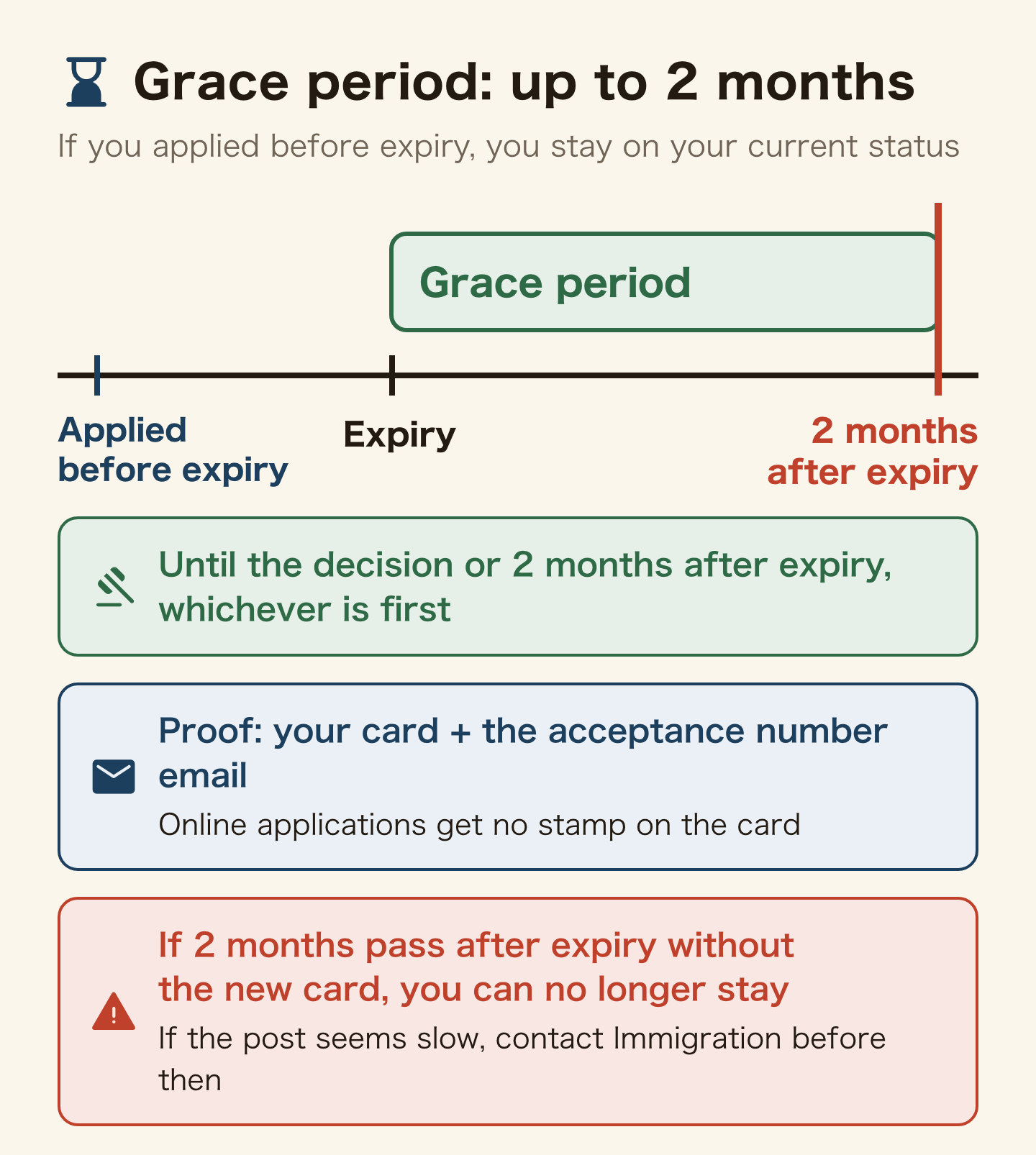
At the counter, Immigration stamps “under application” on the back of your card. An online application puts nothing on the card. Instead, you show the acceptance number email with your card, on your phone screen or printed (ISA, proving a pending online application). If a bank or similar needs the stamp, talk to the immigration office that received your application.
The grace period has two traps:
- If you enter it without extending your My Number card, you can no longer send extra documents online. Send them at the counter or by post instead. Once the city office extends your card, you can file the request for use again and go back online
- Immigration warns that if two months pass after expiry without you receiving the new card, you can no longer stay in Japan. If the post seems slow, contact Immigration before the two months are up
You can travel abroad while the application is pending, but you must come back and be granted within two months of expiry. For what to do if you are refused, see visa renewal denied in Japan.
What if I missed the date or something goes wrong? On the expiry date or after it, go to the counter
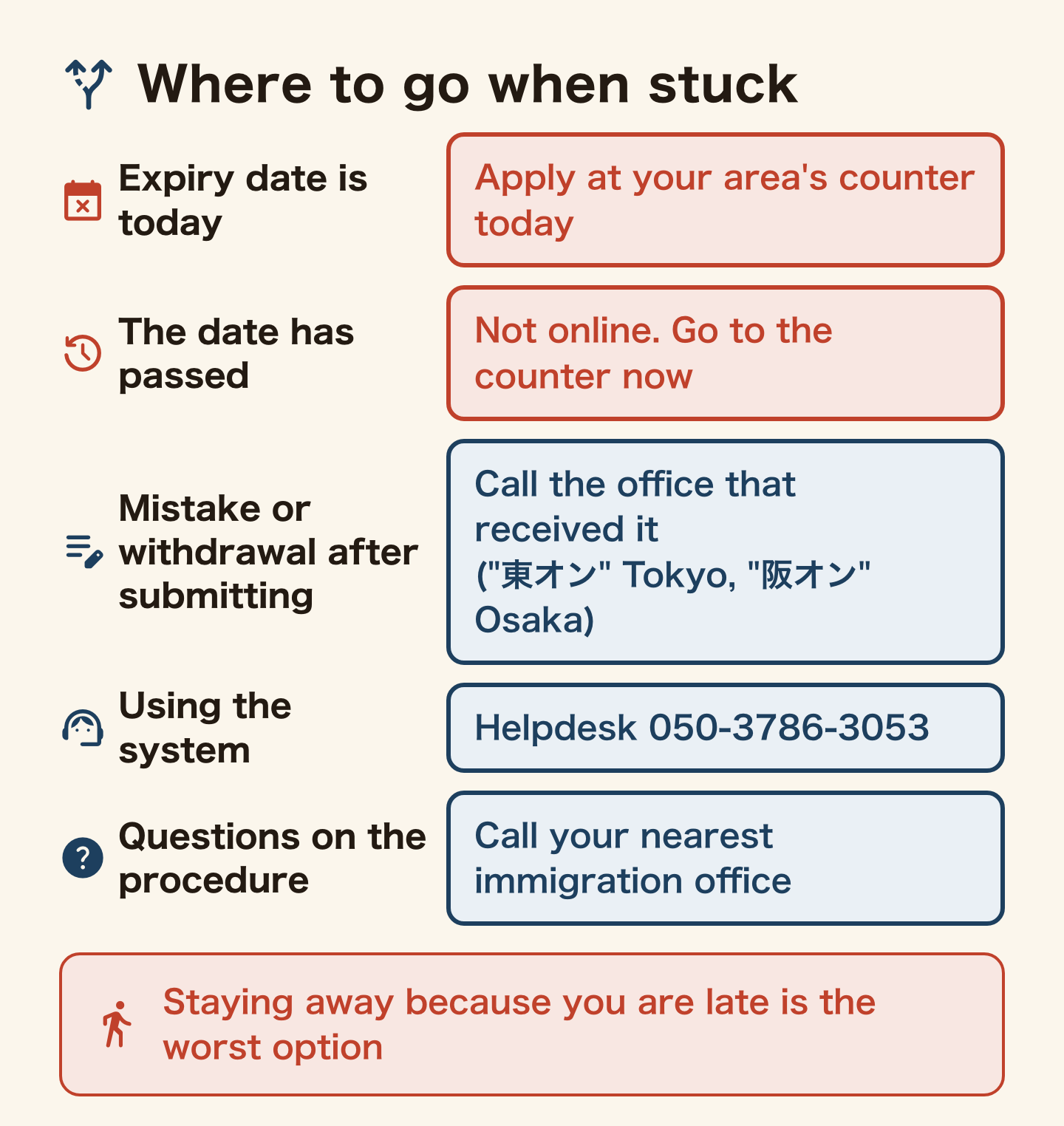
If today is the expiry date, apply at the counter of the immigration office for your area today. If the date has already passed, you cannot apply online, and Immigration asks you to come to the counter promptly and consult them. Staying away because you are late is the worst option.
If you spot a mistake after submitting, you cannot fix it online, and you cannot withdraw an application in the system either. For both, call the office that received it. The first characters of your acceptance number tell you which one: “東オン” is Tokyo, “阪オン” is Osaka.
For help using the system, call the helpdesk on 050-3786-3053. For questions about the procedure itself, call your nearest immigration office.
Which one are you?
- You have a My Number card and expiry is within three months — today, do the user registration and set your email to accept “@rasens-immi.moj.go.jp”.
- You have no My Number card, or its certificates have lapsed — decide to use the counter this time, and put the day you will go in your calendar today.
- You have already applied — today, save and print the acceptance number email. If you need the card soon, switch collection to the counter.
- A fee payment email has arrived — today, check that it came from “@service-dgft.com” and log in to the system yourself to check the status before paying.
- Your expiry date is today, or has passed — go to the immigration counter for your area today.
FAQ
Q. Can I renew my visa in Japan on my phone alone?
No. Immigration does not guarantee the system works in phone or tablet browsers and tells you to use a computer. The phone is for scanning your My Number card with the Mynaportal app.
Q. How much is the online visa renewal fee in Japan?
Extensions and changes accepted by 30 September 2026 cost 5,500 yen. From 1 October it depends on the period granted: 27,000 yen for one year or 42,000 yen for over one and under three years, plus a 330 yen payment charge. That is up to 9,450 yen less than the counter, although for three months or less online costs 330 yen more.
Q. Can I get my new residence card by post?
Yes. But Immigration says postal delivery is taking time and recommends the counter if you want the card quickly. People who also applied for a re-entry permit, or who are granted three months or less, cannot choose post.
Q. My visa expired while my online application is pending. How do I prove I am still legal?
Show your residence card together with the “application acceptance number” email that arrived the day after you applied. Online applications do not get the “under application” stamp on the back of the card.
Q. I got an email asking me to pay the visa fee. Is it real?
Immigration says the fee notice for online applications comes only from “@service-dgft.com”, and requests from any other address are scams. The real notice follows the examination-completed email, so log in to the system yourself and check the status before paying.
Q. Can I apply online on the day my visa expires?
No. On the expiry date, and after it, you apply at the immigration counter for your area. Online filing is open until the day before.
Summary
If you have a My Number card, the Online Residence Application System lets you renew or change your visa from a computer at home. You can file from three months before expiry up to the day before. From 1 October, most bands are cheaper online than at the counter, and you pay at a convenience store or by bank payment.
After you file, keep the acceptance number email that arrives the next day. It is your proof during the grace period. Collect the new card at the counter if you are in a hurry, and never pay a notice that did not come from “@service-dgft.com”. Those two habits make online filing less likely to go wrong.
Official sources: Immigration Services Agency, online residence procedures (Japanese) / ISA, for foreign nationals, legal representatives and relatives / ISA, online application Q&A / ISA, Online Residence Application System User Manual (English, PDF) / ISA, fees and payment for online applications from 1 October 2026 / ISA, delivery of residence cards by post / ISA, proving a pending online application / ISA, suspicious calls and emails claiming to be Immigration. / ISA, convenience store payment steps / ISA, fee revision of 1 October 2026. Procedures checked on 23 September 2026; fees and payment checked on 1 October 2026. Check the official pages before you apply.
Related reading
Found this useful? Share it
Send it to a friend who lives in Japan.
WHO WROTE THIS

mori
Japanese. I read the ministries’ own notices, orders and Q&As in the original, and I start from what my Nepalese and Sri Lankan friends in Japan actually ran into. I do not write about what I have not checked or been told.
What this site can and cannot do →Looking for something else?
You may use the figures in this article, including commercially, if you credit this site with a link. How to use our figures