Checked on 30 September 2026 against PayPay’s official help pages and notices, the official help pages of d-barai and au PAY, and the Immigration Services Agency’s page on residence cards. Limits and fees can change, so check what the app shows before you rely on them.
The short answer
- Foreigners can use PayPay, but you need a Japanese mobile number. An overseas number will not work. PayPay is a QR code payment app: you pay shops and friends by scanning or showing a code on your phone.
- For the identity check, use your residence card or a My Number card. The residence card must have at least 90 days left before it expires when you apply. Under 16s can only use a My Number card.
- Residence cards issued on or after 14 June 2026 are not accepted by PayPay for now. If you have one of the new cards, apply with a My Number card instead.
- Without the identity check, you cannot link a bank account. You can still top up with cash at Seven Bank and Lawson Bank ATMs, but that money can never go back to a bank.
- After the check, your limits go up. Paying from your balance rises from 500,000 to 1,000,000 yen in any 24 hours; sending to friends rises from 100,000 to 300,000 yen.
Knowing this, you can tell before you even open the app whether your residence card will pass, so you stop losing evenings to applications that fail. You can also decide today whether to top up from a bank or at an ATM.
You queue behind someone who says “PayPay” at the till, so you install it too. The app stops you at the phone number screen. When you finally get past that, scanning your residence card gives you “the number you entered is incorrect.” Your Japanese friends shrug: they did it with a driving licence. Japanese nationals never do this check with a residence card, so they have never seen the problem.
- Can foreigners use PayPay in Japan? Yes, with a Japanese mobile number
- What do you need to start PayPay? A number, an ID check and a way to top up
- Which ID can foreigners use for the PayPay check? A residence card with 90+ days left, or a My Number card
- How much do PayPay limits change after the identity check?
- How do you top up PayPay? Bank account after the check, ATM even before it
- What does PayPay cost? Top-ups are free; withdrawals depend on the bank
- What happens to PayPay when you renew your residence card? Updating the check, and the 2-month grace
- PayPay registration or ID check not working? The usual causes
- Can’t pass the ID check yet? Start with ATM cash top-ups
- Can you verify d-barai or au PAY with a residence card?
- Which one are you?
- FAQ
- Summary
- Related reading
Can foreigners use PayPay in Japan? Yes, with a Japanese mobile number
Yes. PayPay’s help pages say that people without Japanese nationality can apply for the identity check too. There are two ways to pay: scan the shop’s QR code with the app, or show the barcode in your app to the cashier. You can also send money to friends.
The first hurdle is the phone number. PayPay says you need a smartphone that can receive SMS and a Japanese mobile number. Overseas mobile numbers cannot be used. A tablet such as an iPad will not do; it has to be a phone that receives SMS.
If you have just arrived and have no SIM yet, get a Japanese number first. A data-only SIM works as long as it can receive SMS, because PayPay offers an SMS route for sign-up (PayPay: how to create an account). For plans you can get without a credit card, see the best SIM options for foreigners in Japan.
The app also works in English. PayPay added an English interface in July 2020, with version 2.36.0 (PayPay Product Blog).
What do you need to start PayPay? A number, an ID check and a way to top up
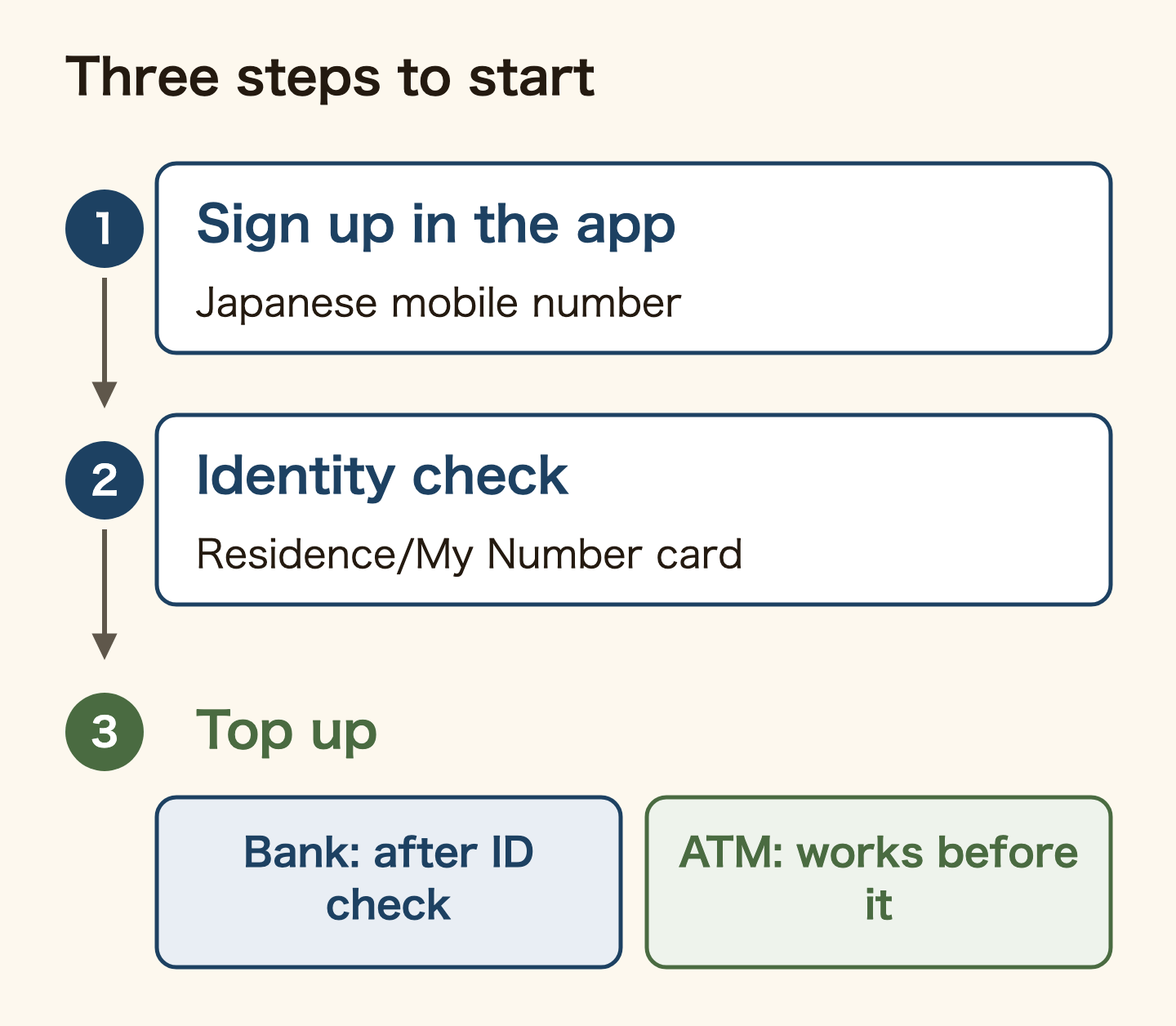
- Sign up in the app: verify your Japanese mobile number by SMS
- Do the identity check (eKYC): your residence card or My Number card, plus a photo of your face
- Top up: from a bank account, or with cash at an ATM
You can pay in shops without step 2. Skip it, though, and you cannot link a bank account, and your limits stay low. According to PayPay, once you pass the check you can top up and send money through your bank account, and get full compensation faster if you are defrauded.
You sign up with a SIM in a friend’s name, or a relative’s number. Where you come from, that may be normal. In Japan, PayPay’s identity check only works for the person who holds the phone number. Its help page says the owner of the mobile number and the person verified in the app must be the same. Register with a number in your own name.
Which ID can foreigners use for the PayPay check? A residence card with 90+ days left, or a My Number card
PayPay accepts a My Number card, a driving licence, a driving history certificate, a residence card and a special permanent resident certificate. But foreign nationals whose stay has an end date must use a My Number card, a residence card or a special permanent resident certificate, so that PayPay can see when the stay ends. The driving licence is not on that list.
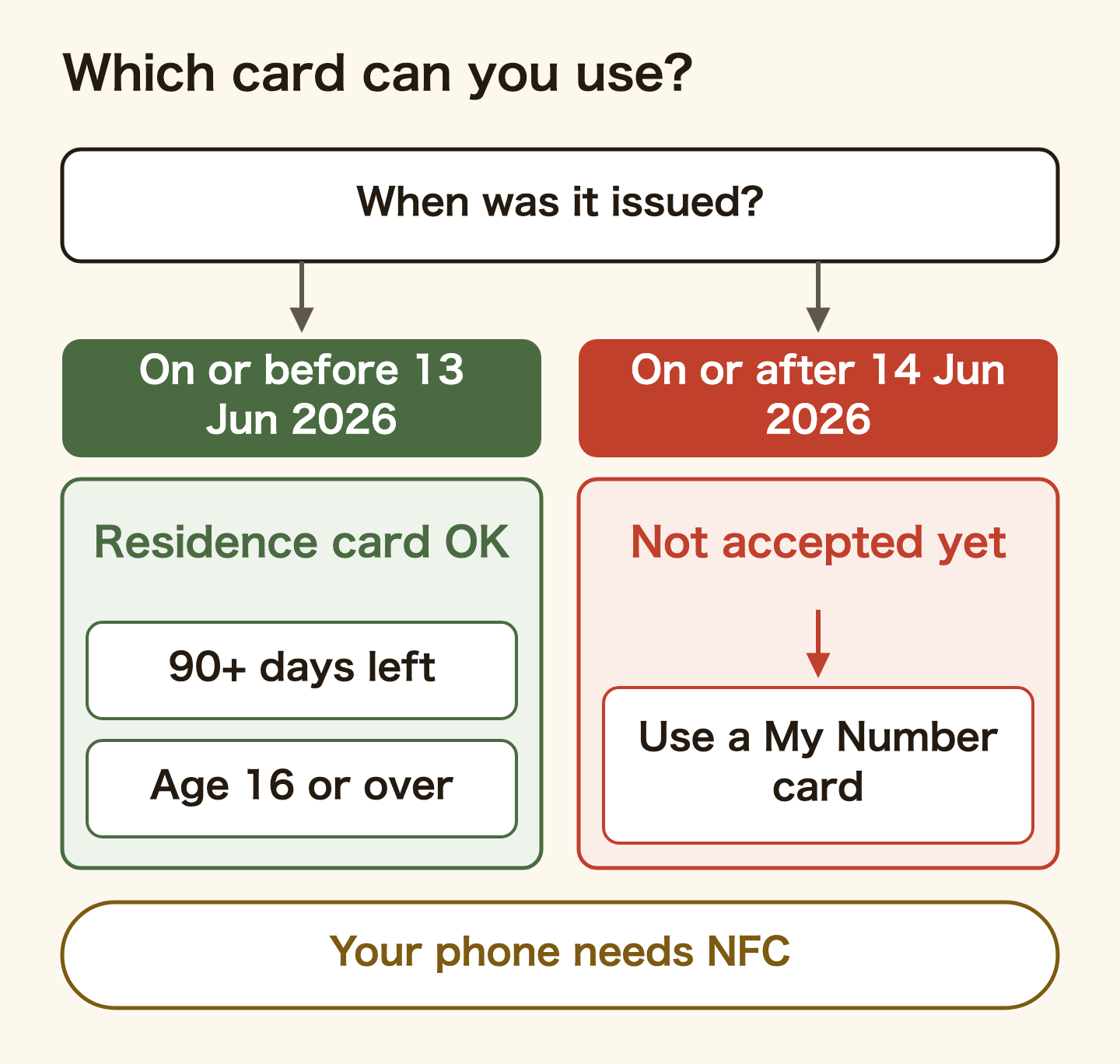
The residence card conditions are set out in PayPay’s step-by-step guide to the identity check:
- At least 90 days left before the card expires, counted from the day you apply
- Aged 16 or over (foreign nationals under 16 can only use a My Number card)
- A phone with NFC, so it can read the card’s IC chip
- PayPay app version 4.55.0 or later
- Your name typed exactly as on the card, and the katakana reading matching the bank account you will link
The biggest trap is the date your card was issued. The Immigration Services Agency switched residence cards to a new design from 14 June 2026, and what is printed on the card changed. On 7 July 2026, PayPay announced that residence cards and special permanent resident certificates issued on or after 14 June 2026 cannot be used for its identity check for the time being (PayPay notice). No date has been set for when they will be accepted.
If you arrived on or after 14 June, or got a new card since then through a renewal or change of status, you have one of these cards. Check the issue date printed on your residence card. With a new card, do the check with a My Number card. If you do not have one yet, you apply at your city office; the steps are in My Number card for foreigners.
Review takes as little as the same day when you apply by reading an IC chip, and a few days otherwise. The result arrives as a push notification. When your account screen says “verified”, you are done.
How much do PayPay limits change after the identity check?
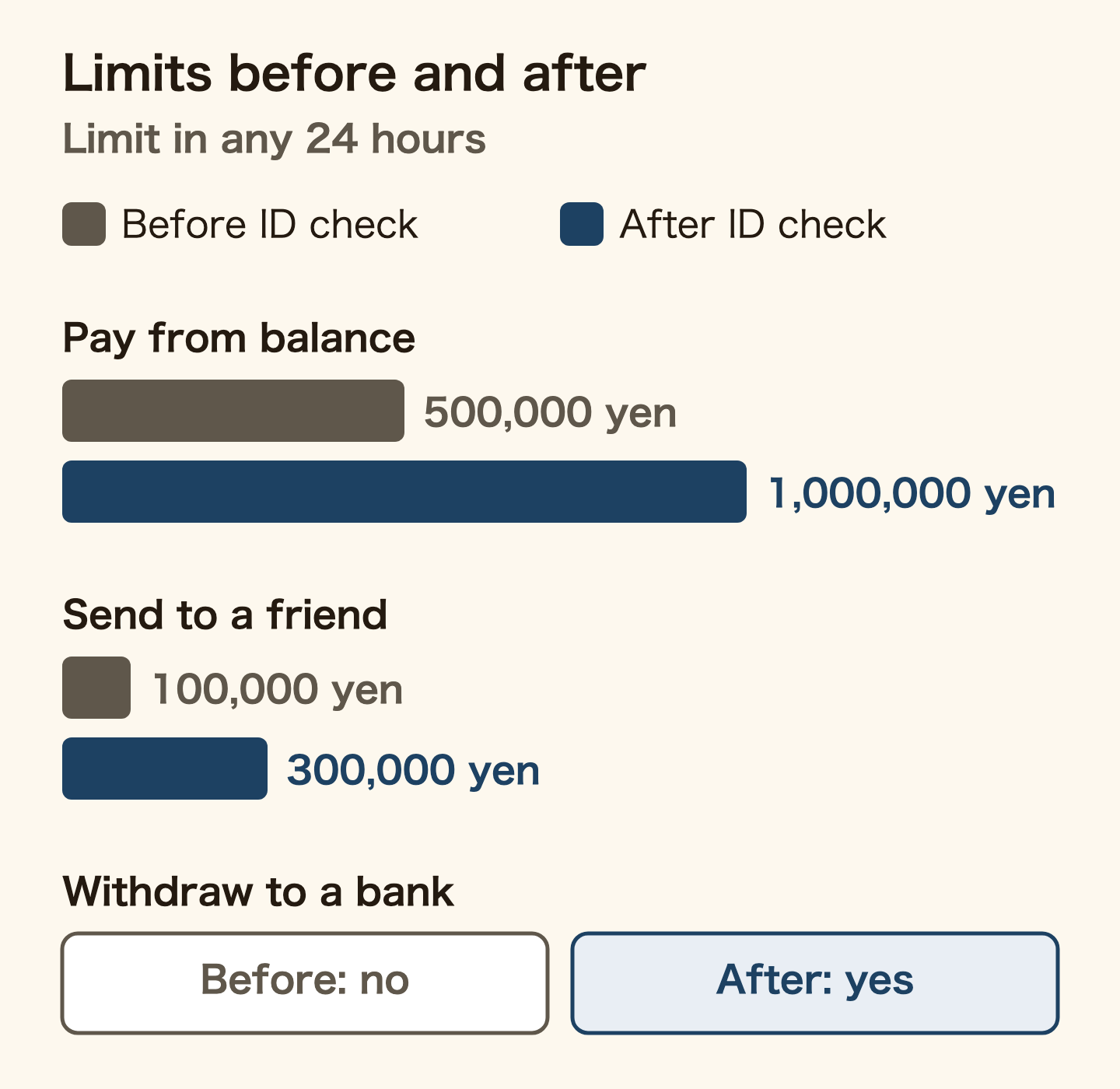
The limits come from PayPay’s official limits table. These three change with the identity check:
| What | Before the check | After the check |
|---|---|---|
| Pay from your balance | 500,000 yen in any 24 hours; 2,000,000 yen in any 30 days | 1,000,000 yen in any 24 hours; 2,000,000 yen in any 30 days |
| Send to a friend | 100,000 yen in any 24 hours; 500,000 yen in any 30 days; 300,000 yen per calendar month | 300,000 yen in any 24 hours; 1,000,000 yen in any 30 days |
| Withdraw to a bank | Not possible | Possible (PayPay Money only) |
There is also a cap on what you can hold: up to 1,000,000 yen each in PayPay Money and PayPay Money Lite.
The check changes more than the limits. Linking a bank account and moving money back to it only become possible after it.
How the 24-hour and 30-day limits are counted
“Any 24 hours” does not reset at midnight. Each payment frees up its share of the limit 24 hours after you made it (PayPay: how limits are counted). Pay 20,000 yen at noon on 25 December, and that 20,000 yen comes back at noon on 26 December. “Any 30 days” works the same way over 720 hours.
The 300,000-yen monthly cap on sending before the check is different: it counts from 00:00 on the 1st to 23:59 on the last day of each month.
How do you top up PayPay? Bank account after the check, ATM even before it
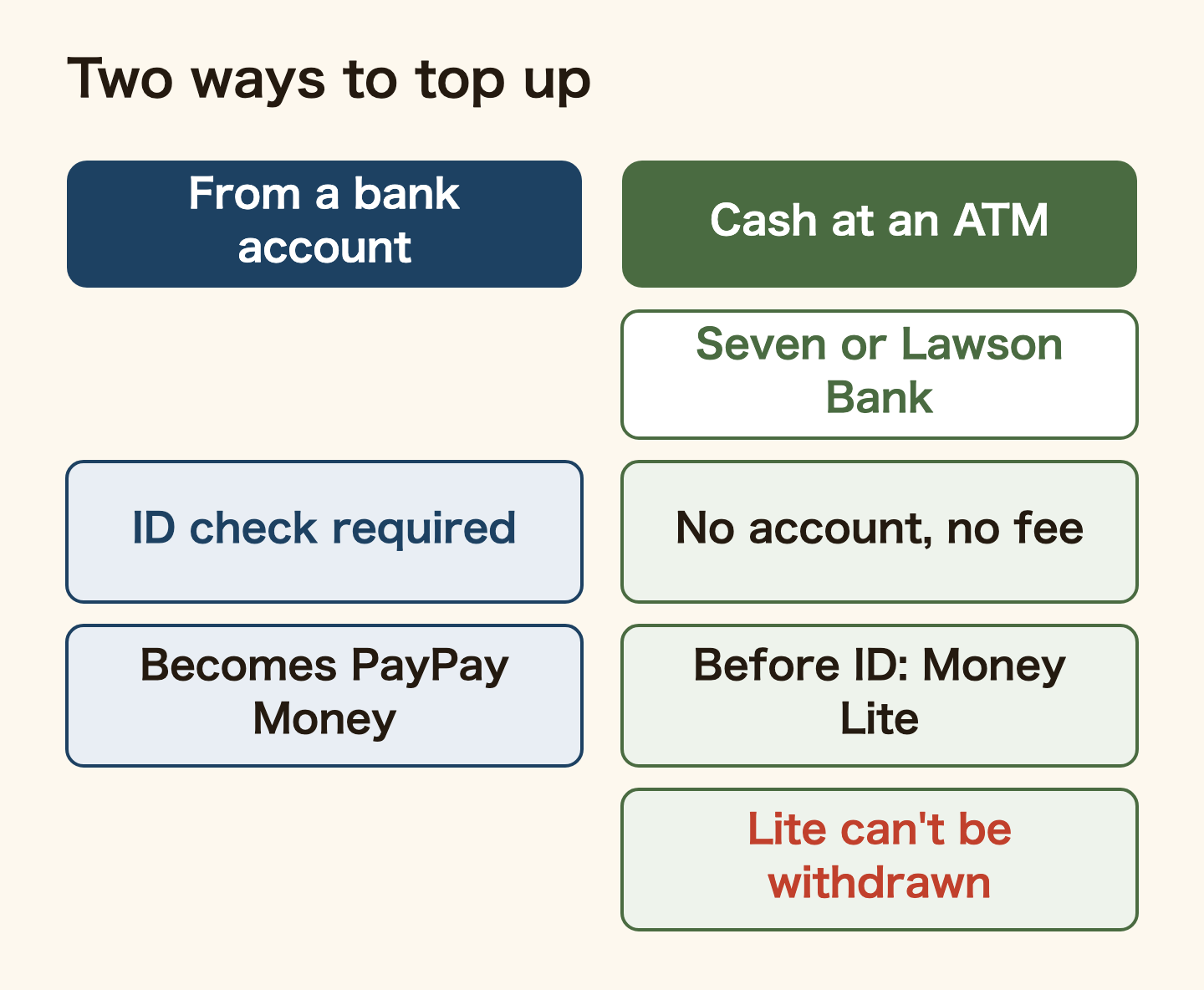
To top up from a bank, you first register the account in PayPay. Registering needs the identity check, and only accounts in your own name are allowed. What you need to register (passbook, cash card, PIN, one-time password) depends on the bank. If you have no account yet, start with opening a bank account in Japan as a foreigner.
Without a bank account, you can still top up with cash. Seven Bank and Lawson Bank ATMs charge no fee and do not need an account with either bank.
- On the ATM screen, choose “smartphone transaction” (or “charge” / “QR charge”)
- In the PayPay app, tap [+] on the home screen, then “ATM charge”, and scan the QR code on the ATM
- Enter the number shown in the app into the ATM (finish within 10 minutes)
- Insert the amount you want to add and confirm it
Watch which kind of balance you get. Cash added at an ATM before the identity check becomes “PayPay Money Lite”. Money Lite can never be withdrawn to a bank, even after you pass the check (PayPay: withdrawing to a bank). It cannot pay taxes such as resident tax either, so if you plan to pay tax with PayPay, pass the check before you top up.
Newer Lawson Bank ATMs give change. On older machines without change, everything you insert is added.
What does PayPay cost? Top-ups are free; withdrawals depend on the bank
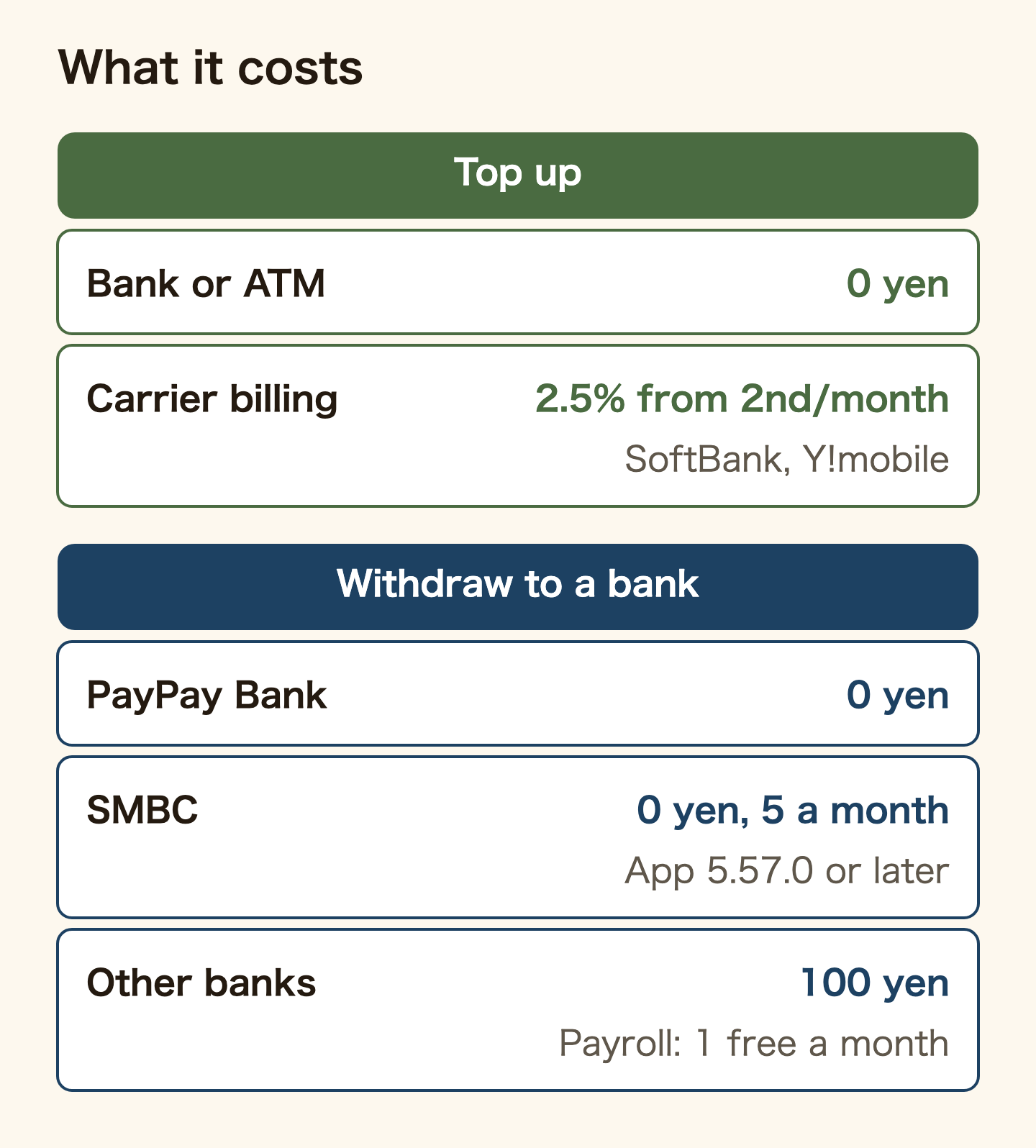
Topping up is almost always free. In PayPay’s top-up guide, only SoftBank and Y!mobile carrier billing costs anything: 2.5% (tax included) from the second top-up each month. Every other method is free.
Where you can pay a fee is moving money out of PayPay to a bank:
- PayPay Bank: free, any number of times
- SMBC (Sumitomo Mitsui Banking Corporation): free up to 5 times a month, then 100 yen (app 5.57.0 or later; automatic split transfers do not count)
- Other banks: 100 yen
- PayPay payroll users: one free withdrawal a month to an account in your name when it includes salary money
Only PayPay Money can be withdrawn. Top-ups and withdrawals cannot be cancelled.
What happens to PayPay when you renew your residence card? Updating the check, and the 2-month grace
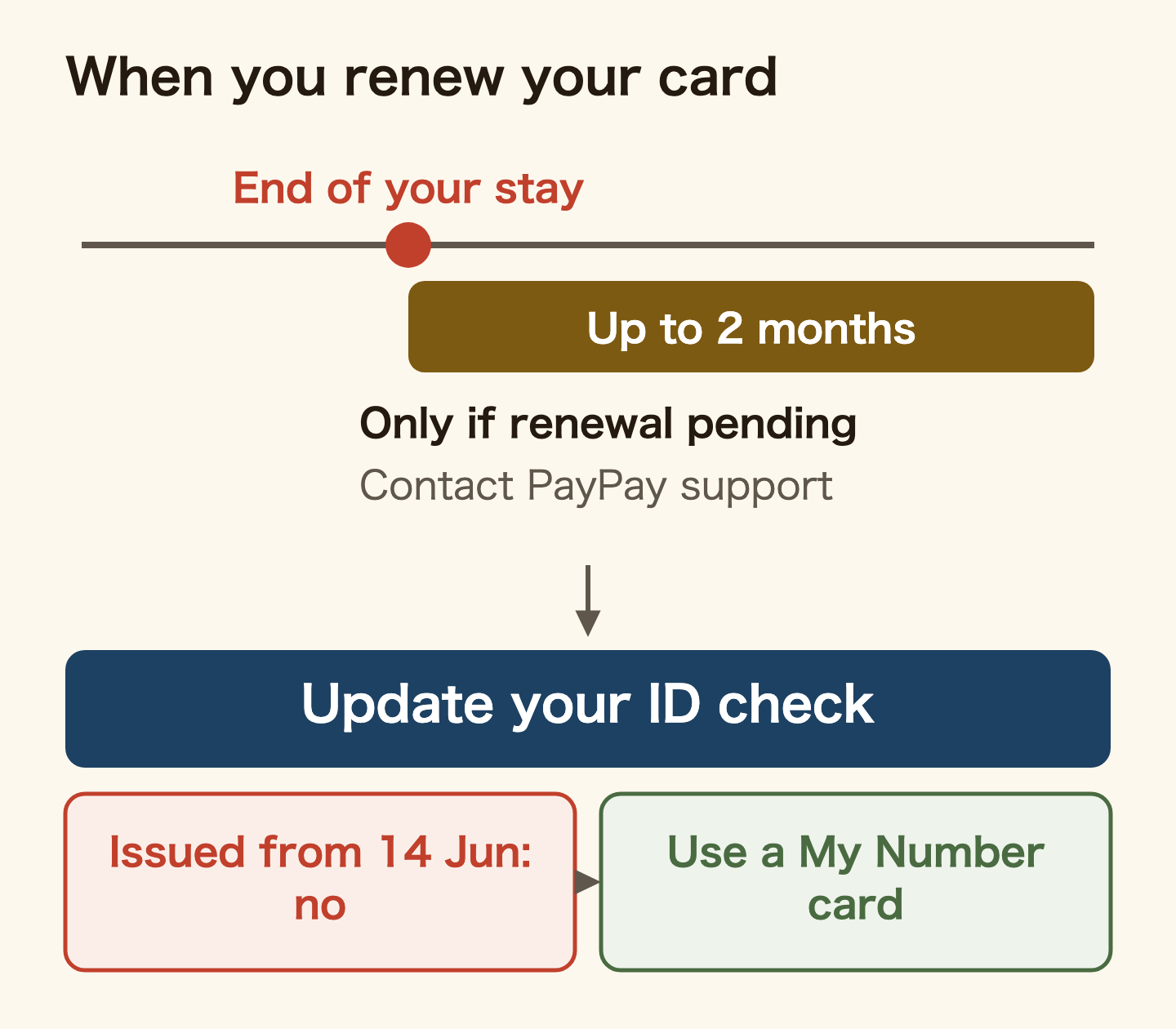
Sometimes you apply to renew your stay and the result has not come by the expiry date. PayPay’s help page says that if it can confirm your renewal is pending, you can keep using PayPay for up to 2 months after your period of stay ends. The proof is the back of your residence card or the Immigration email confirming your online application. It needs a separate procedure, so contact PayPay customer support.
When you receive your new residence card, update the identity check in PayPay too. That new card will have been issued after 14 June 2026, so PayPay cannot use it yet; update with a My Number card instead. For the renewal itself, timing and documents are in visa renewal in Japan.
PayPay runs its identity checks under Japan’s Act on Prevention of Transfer of Criminal Proceeds, and may ask you by SMS or otherwise to confirm your details. If you do not update within a set period after the request, some functions may be restricted. Update when asked, even if nothing has changed. If you move house, correct your address yourself.
PayPay registration or ID check not working? The usual causes
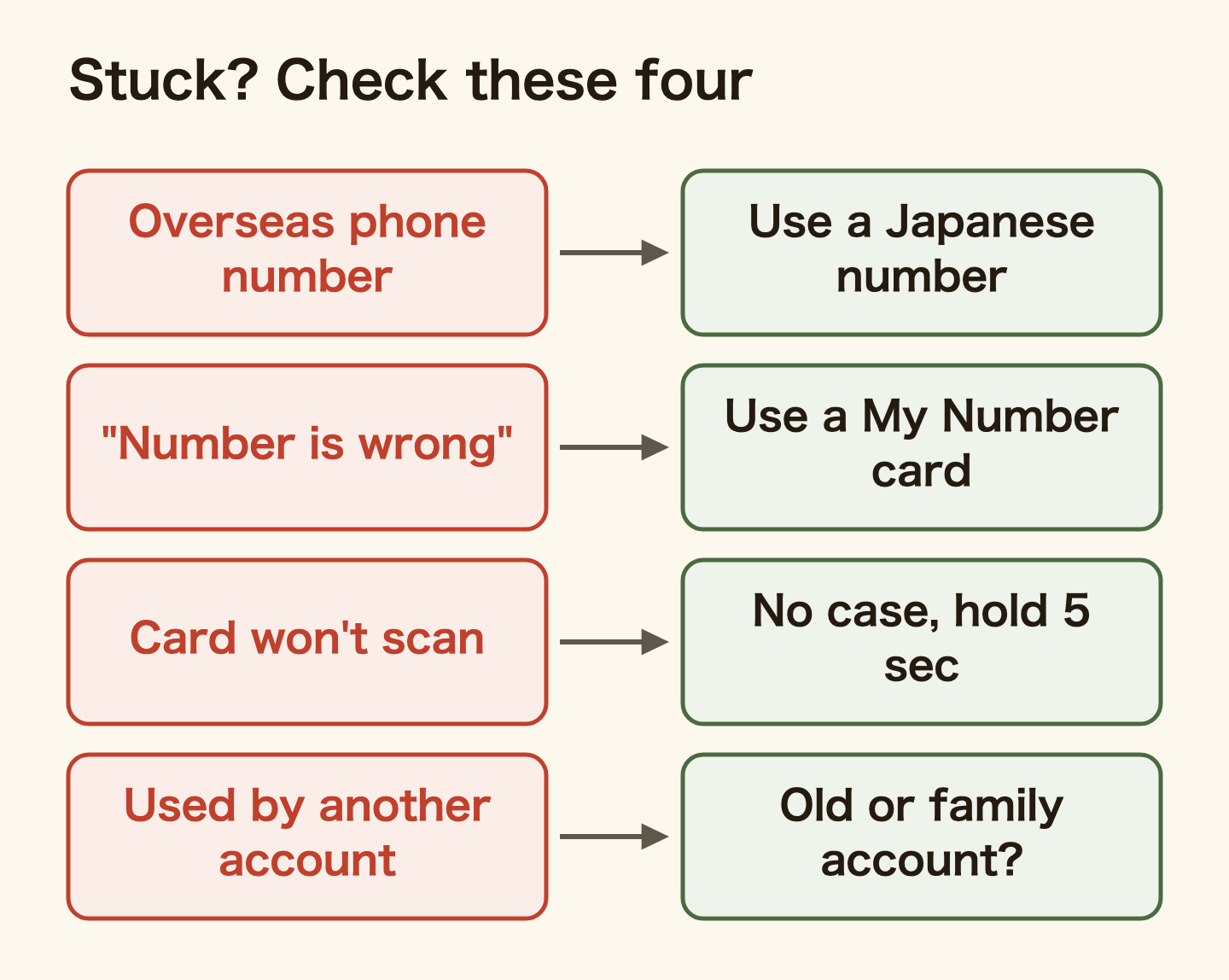
People get stuck in the same few places. These come from PayPay’s “identity check not working” help page, picked for what foreigners tend to hit:
- “The number you entered is incorrect” (入力した番号に誤りがあります): this is what you see when you apply with a residence card issued on or after 14 June 2026. Apply with a My Number card. The 12-character card number is 2 letters, 8 digits, then 2 letters
- The card will not scan: take the phone and card out of their cases and unplug charging or earphone cables. Lay the phone on the card and hold each position still for at least 5 seconds. Turn off airplane mode
- “This information is already registered to another account” (この情報は別のアカウントに登録済みです): an account on a phone number you used before, or a family member’s account, may already hold a completed check with the same details
- Your name will not go in: match the card exactly. Put middle names with the given name, separated by a full-width space. If your card shows both an alphabet name and a kanji name, enter just one of them (PayPay: how to enter names)
- The bank account will not register: the account name must match the name in your identity check. Look for stray spaces in your name as well
- “This phone number cannot be registered”: after you close a PayPay account, the same number cannot sign up again for 180 days
You may also see “your use is currently restricted” when paying. This happens after repeated top-ups of the same amount, or when a transaction is flagged by PayPay’s monitoring. PayPay asks you to wait a few days or use another method. Contacting them again and again does not speed up the review.
PayPay’s help pages also carry a warning about refund scams and phishing emails. For calls and messages that pose as the police or Immigration to make you pay, see scams in Japan that target foreigners.
Can’t pass the ID check yet? Start with ATM cash top-ups
Your residence card was issued after 14 June and you have no My Number card yet. Or your residence card has fewer than 90 days left. You can still start using PayPay without the check.
Top up with cash at a Seven Bank or Lawson Bank ATM and you can pay in shops. You can pay up to 500,000 yen from your balance in any 24 hours, and send up to 100,000 yen to friends. The money becomes Money Lite and can never go back to a bank, so only add what you will spend. Once you have a My Number card, do the identity check.
Can you verify d-barai or au PAY with a residence card?
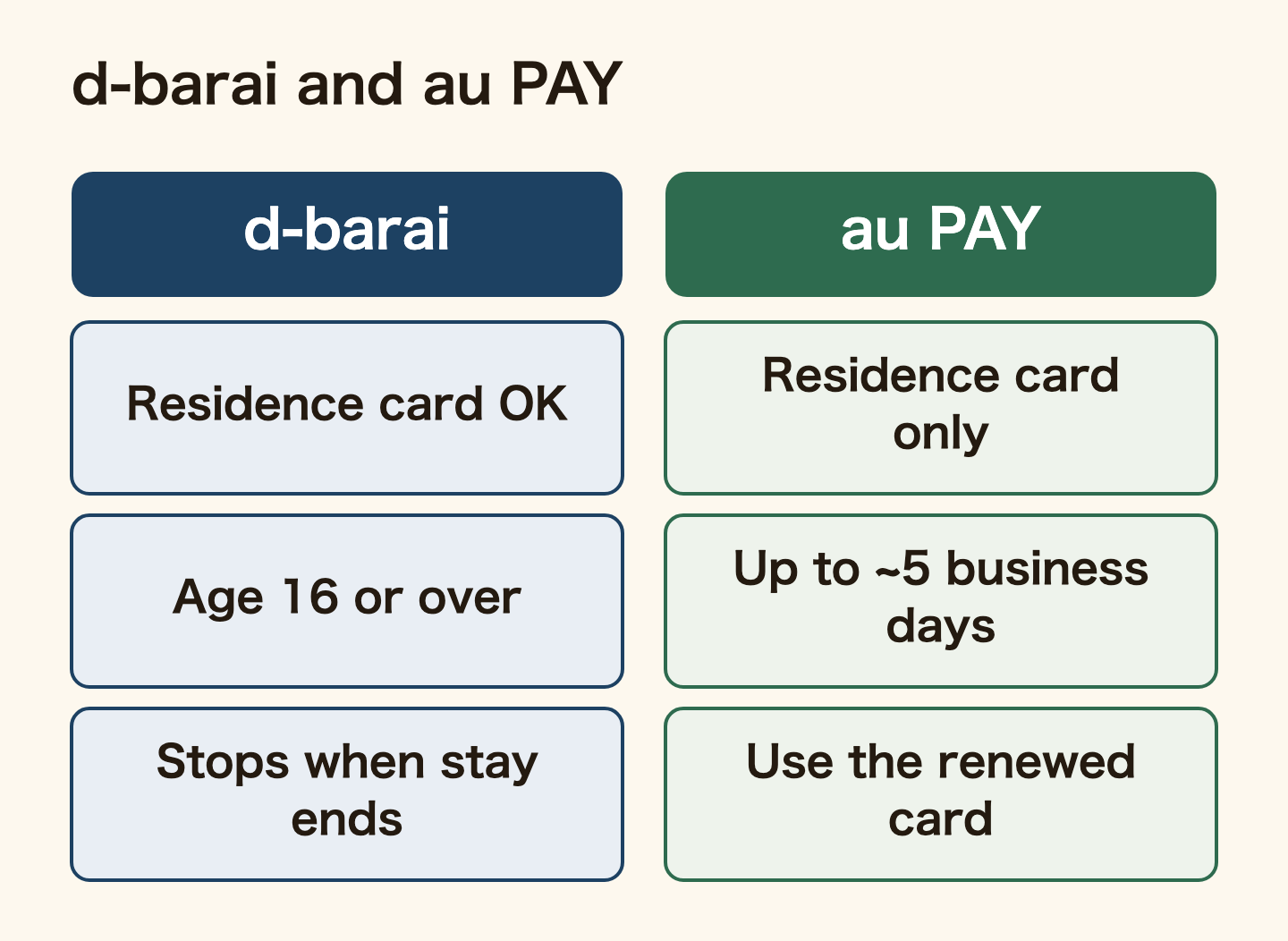
Other QR code payment apps also accept residence cards for the identity check. Here is only what their official help pages say.
For d-barai (NTT Docomo), the online identity check takes a driving licence, a My Number card or a residence card. Under 16s cannot apply with a residence card. The check unlocks topping up from a bank, sending money and withdrawing, among other things. When the period of stay on the residence card you used ends, d-barai stops working. Verify again with your renewed residence card and it works again.
au PAY says people without Japanese nationality verify with a residence card. Reading the card with the camera takes up to about 5 business days to review. The check can only be done in the au PAY app on a smartphone. After you renew your status or period of stay, use the renewed card. Sending and withdrawing money need either the identity check or a linked au Jibun Bank account.
Neither help site says whether it accepts residence cards issued on or after 14 June 2026. Check the in-app guidance before you apply.
Which one are you?
- No Japanese mobile number yet: get a SIM first, because PayPay will not take an overseas number. Today, pick a plan you can sign up for without a credit card.
- Your residence card was issued on or before 13 June 2026 and has 90+ days left: verify with it. Today, apply with your name and katakana reading matching both the card and your bank account.
- Your residence card was issued on or after 14 June 2026: verify with a My Number card. Today, check whether you have one and apply at your city office if not. Until then, use ATM cash top-ups.
- Your renewal is pending and your stay ends soon: contact PayPay customer support and ask for the up-to-2-month arrangement. Today, have the back of your residence card or the Immigration confirmation email ready.
FAQ
Q. Can foreigners use PayPay?
Yes. You need a Japanese mobile number and a smartphone that receives SMS. An overseas mobile number cannot be used to register.
Q. Can I use my residence card for the PayPay identity check?
Yes, if at least 90 days remain before it expires when you apply and you are 16 or over. Residence cards issued on or after 14 June 2026 are not accepted for now. In that case, apply with a My Number card.
Q. The check says “the number you entered is incorrect”. Why?
PayPay says this message appears when you apply with a residence card issued on or after 14 June 2026. Apply with a My Number card instead.
Q. What happens if I skip the identity check?
You cannot link a bank account or use PayPay Money. Paying from your balance is capped at 500,000 yen in any 24 hours, and sending at 100,000 yen. Cash added at an ATM becomes Money Lite and cannot be withdrawn to a bank.
Q. Can I top up PayPay without a bank account?
Yes. You can add cash at Seven Bank and Lawson Bank ATMs with no fee and no account at either bank.
Q. Can I use PayPay while my visa renewal is pending?
PayPay says you can use it for up to 2 months after your period of stay ends if it can confirm the pending renewal from the back of your residence card or the Immigration confirmation email. It needs a separate procedure, so contact customer support.
Summary
Foreigners can use PayPay. People get stuck when they have no Japanese mobile number, when their residence card has fewer than 90 days left, and when they hold one of the new residence cards issued on or after 14 June 2026. With a new card, do the identity check with a My Number card.
The check lets you link a bank account, raises your limits and lets you move money back to the bank. Until then, ATM cash top-ups work, but that money cannot go back to a bank, so keep the amounts small. When you renew your residence card, remember to update your PayPay identity check too.
Official sources: PayPay: what you need to use PayPay / PayPay: about the identity check (eKYC) / PayPay: doing the identity check / PayPay notice on residence cards issued on or after 14 June 2026 / PayPay: identity check not working / PayPay: usage limits / PayPay: cash top-up at ATMs / PayPay: registering a bank account / PayPay: withdrawing to a bank / Immigration Services Agency: what is a residence card? / d-barai: documents for the online identity check / au PAY: identity check (all in Japanese except the PayPay blog; checked 30 September 2026). Limits, fees and accepted documents can change, so check the app before you apply.
Related reading
WHO WROTE THIS

mori
Japanese. I read the ministries’ own notices, orders and Q&As in the original, and I start from what my Nepalese and Sri Lankan friends in Japan actually ran into. I do not write about what I have not checked or been told.
What this site can and cannot do →Looking for something else?