Checked on 7 November 2026 against the Council of Anti-Phishing Japan’s monthly report (September 2026), the National Police Agency’s phishing page and its 2025 cyber threat report, the Information-technology Promotion Agency (IPA), the National Tax Agency, the Ministry of Internal Affairs and Communications, the Immigration Services Agency and Japan Post. Most of these pages are in Japanese.
The short answer
- Phishing means fake emails or texts, sent in the name of a real company or office, that lead you to a fake site to steal your ID, card number and more. Japan’s anti-phishing council received 94,661 reports in September 2026.
- Assume you cannot tell by looking. The sender’s name, natural Japanese and the lock icon prove nothing.
- Do not tap the link. Check in the official app or from your own bookmark. If the same notice is not there, ask an official contact you looked up yourself. The one exception is Immigration’s online payment email: check its conditions, then follow it.
- If you entered nothing and installed no app, IPA’s guidance says you can just close the page. If you entered something, what you entered decides who to call today.
- For advice, use #9110 and 188. If you lost money or data, go to a police station or the prefectural police cyber desk.
Knowing this, you can stop guessing whether a message is real and run the same 3 steps every time. And if you do tap, you will know who to call that same day.
You are on the train home when a text arrives: “We came to deliver your parcel, but you were out.” You are in fact waiting for an online order. You can read about half the Japanese. You send a screenshot to a Japanese friend and ask if it is real. “Just ignore the suspicious ones,” comes the reply. But knowing which ones are suspicious was the whole question.
- What is phishing in Japan, and how common are fake texts and emails?
- How do you spot a phishing message? You change the route, not your eyes
- What should you do before tapping? 3 steps that skip the link
- How do you check a fake delivery, bank, card or phone company text?
- Are tax, pension and city hall emails real? The tax agency puts no URLs in SMS
- Are emails from Immigration real? Real payment emails meet set conditions
- How do you read a URL? Check .go.jp and .lg.jp at the right end
- Can’t read Japanese? Using a translation app safely
- What if you tapped a phishing link? What you entered decides the steps
- Installed a fake app on Android? Airplane mode comes first
- Where do you report phishing in Japan, and what does it cost?
- Will you get your money back? Ask the bank or card company, and know what is hard to recover
- Which one are you?
- FAQ
- Summary
- Related reading
What is phishing in Japan, and how common are fake texts and emails?
The National Police Agency describes phishing as messages that pose as real services or companies and lead you to a fake site, where your ID and password are stolen or your phone is infected with malicious software. When the lure arrives by SMS, it is also called smishing.
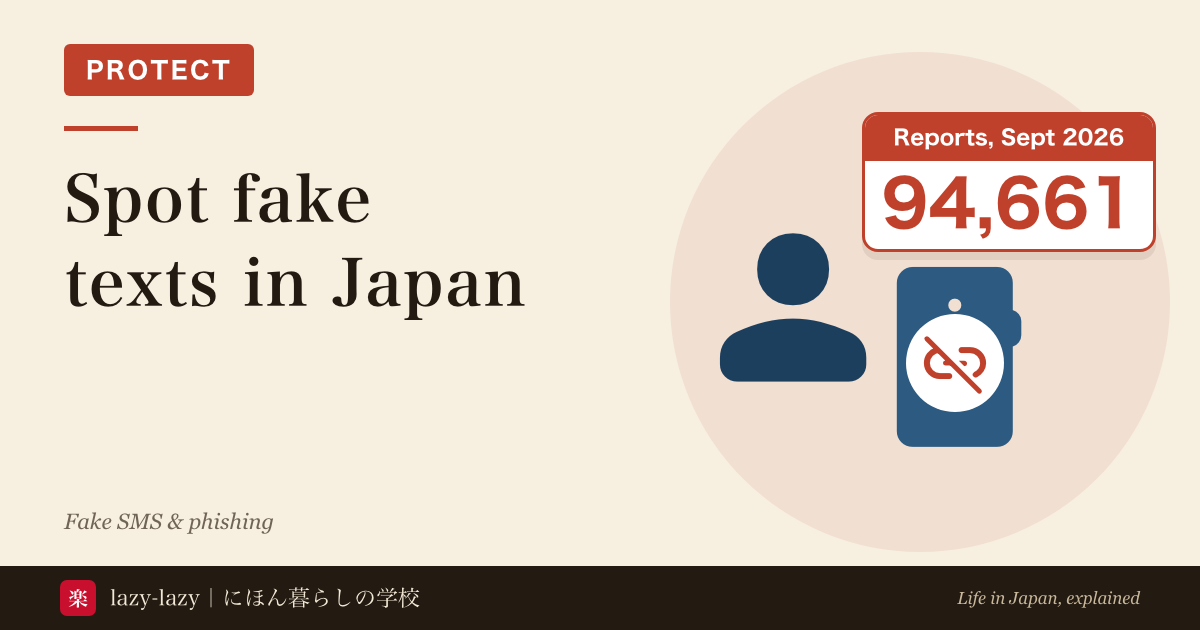
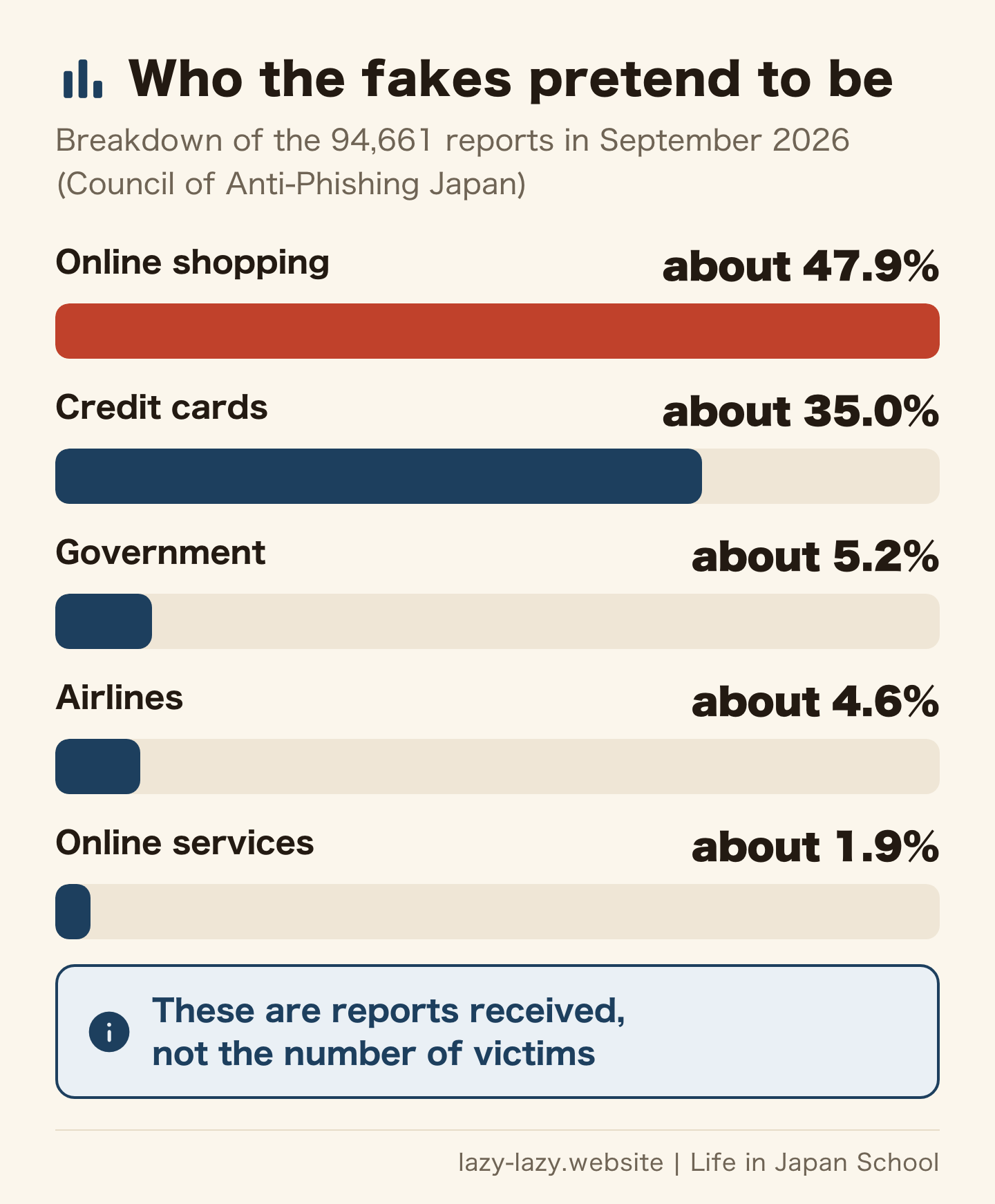
The Council of Anti-Phishing Japan received 94,661 reports in September 2026, up 12,323 from 82,338 in August. Criminals misused 105 brand names. From April to July, reports had fallen from 151,112 to 66,119. The total for all of 2025 was 2,454,297 (National Police Agency).
Read those numbers with care. They count reports sent to the council, not victims. We also found no figure for foreign residents alone.
There are damage figures too. In 2025, illegal online-banking transfers reached 4,747 cases and about 10.397 billion yen, and phishing made up about 90% of the methods. Credit card fraud of all kinds came to about 51 billion yen (National Police Agency report).
How do you spot a phishing message? You change the route, not your eyes
Everyone wants a trick for spotting fakes. Yet the Council of Anti-Phishing Japan says telling them apart is extremely hard. A sender can be faked to look identical. The text is copied from real mail or written in natural Japanese by AI. Fake sites show the lock icon too. IPA adds that https only tells you the connection is encrypted, not that the site is safe.
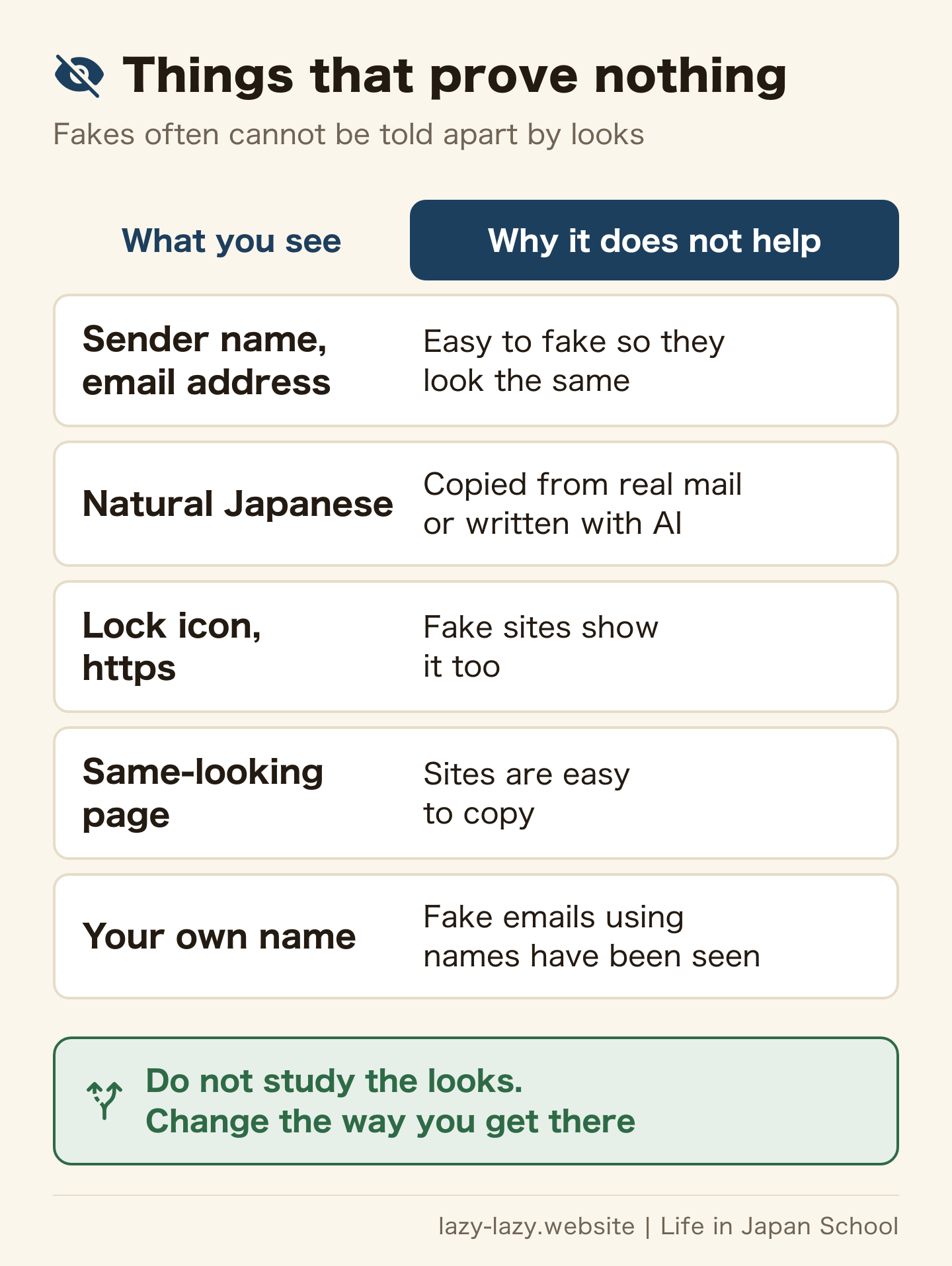
Plenty of fakes still use odd Japanese (Japan Post). So odd wording is a reason to doubt. Clean wording, though, is no reason to trust.
That is good news if your Japanese is limited. You do not need to decode the message. You only need to change how you get to the service.
What should you do before tapping? 3 steps that skip the link
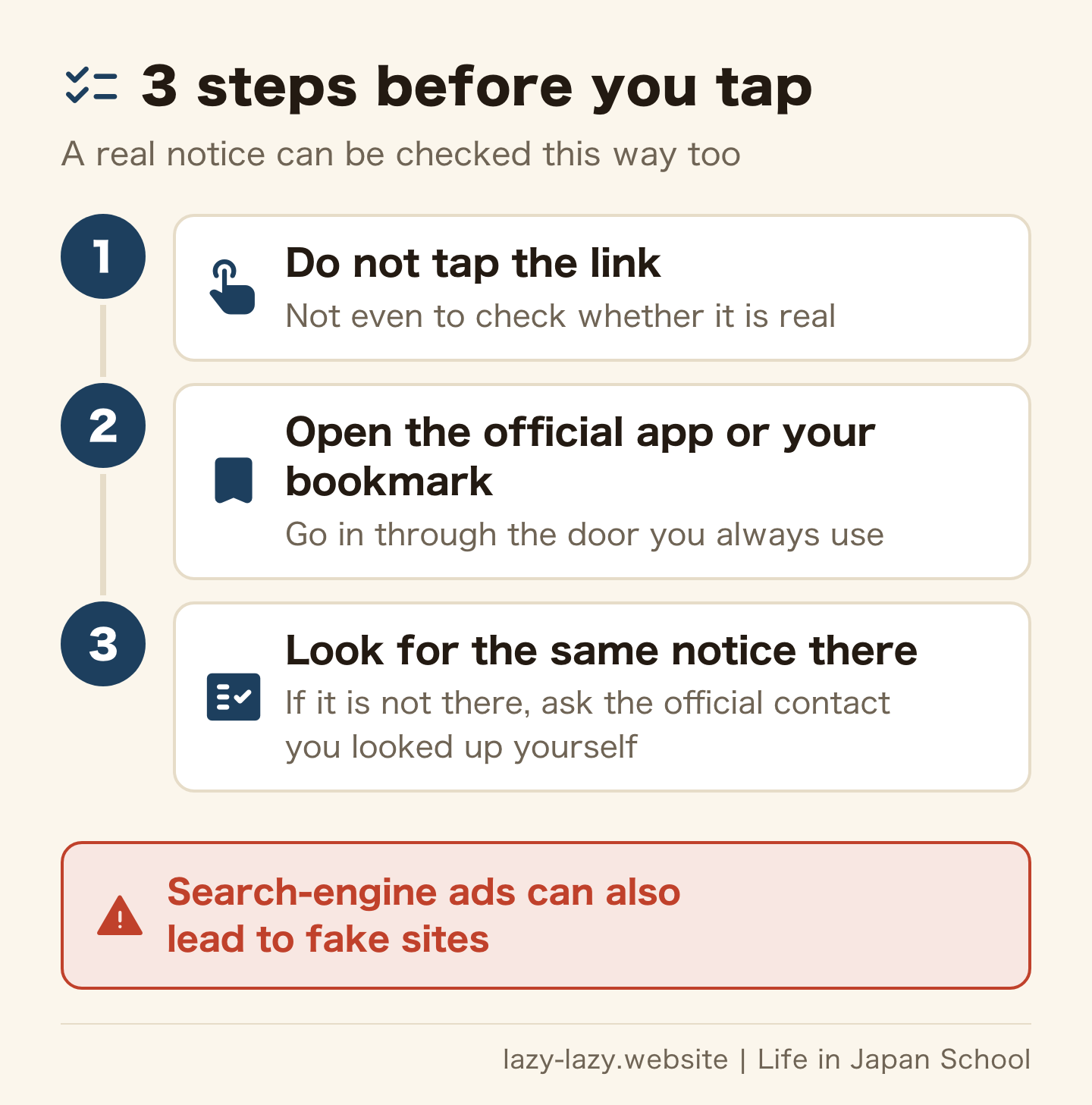
This is what both the police and the council recommend. If the same notice shows up in the official app or your account page, you can deal with it there without the link. If it does not, ask that brand’s support desk. The council itself does not judge whether a message you received is real.
Searching for the official site at that moment is a slightly risky route, because search-engine ads are also used as bait. Today, while you are calm, bookmark your bank, card, phone company and parcel tracking, or install their official apps.
If you want more protection, turn on multi-factor login or passkeys where offered. A password manager fills in your details only on the real sites you saved, so it stays silent on a fake one. And use a different password for each service.
How do you check a fake delivery, bank, card or phone company text?
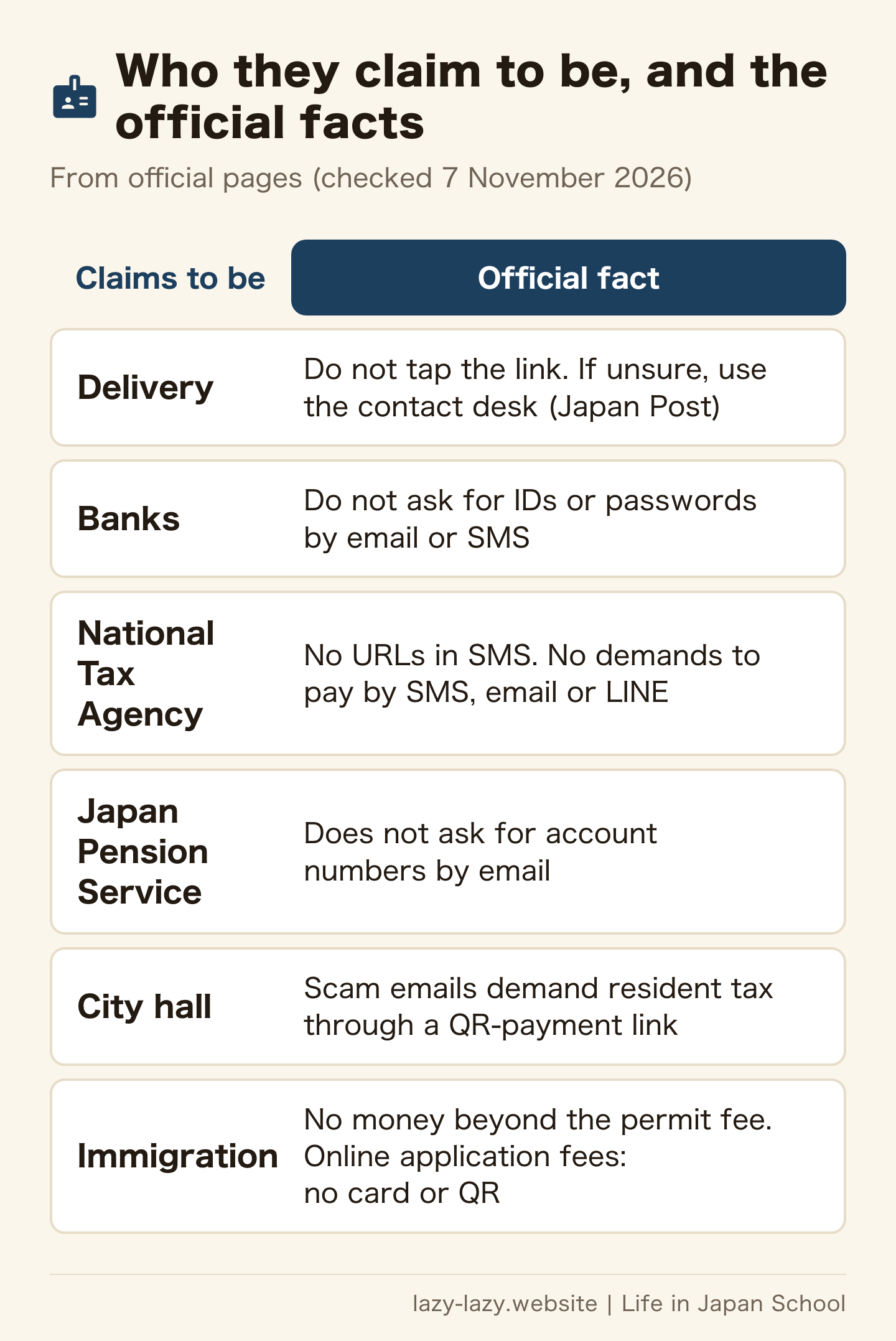
The missed-delivery text is one of the examples police list. Japan Post warns about lines meant to rattle you, such as “pay within so many hours or delivery will be cancelled”. The same page excludes only one thing from its list of suspicious messages: texts sent for missed deliveries by Yubinkyoku Bussan Service Co. It does not say whether those texts carry links. If unsure, it tells you not to tap and to use the contact at the bottom of the page. Our own view is that the number on the paper slip or official tracking is the quickest check. Our guide to redelivery slips shows where the number is.
As for banks, financial institutions do not ask for IDs or passwords by email or SMS (National Police Agency). If you are asked, stop right there. Credit card and finance companies made up about 35.0% of September’s reports. If a message says fraud was detected, look at your statement in the official app.
Phone company fakes talk about huge bills, suspended service or unpaid charges (KDDI). NTT Docomo also tells customers to skip the link and use their usual bookmark or app. Texts posing as electricity and water providers were reported in September too.
One more pattern: messages “for Android only”. They use points, app updates or applications as an excuse to make you install an app. Close the browser if this happens. Install apps only from your phone’s official store or the genuine site.
Are tax, pension and city hall emails real? The tax agency puts no URLs in SMS
A message from a government office arrives on your phone, and you tap the link and pay your tax. Where you come from, that may be normal. In Japan, the National Tax Agency does not send SMS notices with URLs. It also does not demand payment or announce seizure of assets by SMS, email or LINE. e-Tax emails carry no attachments and, as a rule, no URLs. An offer to install “the e-Tax app” is fake too: as of 30 September 2026, no smartphone e-Tax app exists.
City halls get impersonated as well. The Ministry of Internal Affairs and Communications has confirmed scam emails that pose as municipal tax offices and demand resident tax through a QR-payment link. Emails threatening seizure over national pension payments work the same way. The Japan Pension Service does not ask for account numbers by email.
If you are genuinely worried about unpaid tax, ignore the email. Check using the notice you have at home, or a number for the city hall or pension office that you looked up yourself. What to do when you cannot pay is covered in a separate guide.
Are emails from Immigration real? Real payment emails meet set conditions
Immigration is the exception. For applications made online on or after 1 October 2026, you pay the fee at a convenience store or by bank, following a payment email. So a genuine email with a link exists. Applications received by 30 September still use revenue stamps, even if the permit comes in October or later. Applications at a counter also use revenue stamps. Immigration lists these conditions:
- It arrives some time after the examination-completed email
- The email with the payment link comes from @service-dgft.com, and the emails for choosing a payment method and confirming payment come from @veritrans.jp
- The “to” field shows your authentication ID and your name (a long name may be cut off), and the order ID is built from your residence card or passport number, your application number and so on
- It goes only to the email address registered in the system
- Online application fees are never requested by credit card or QR code, and no paper payment slip is sent
- Immigration asks for no money beyond the permit fee for an application. A separate payment charge goes to the payment company (330 or 550 yen for a change of status or renewal, depending on the permit period)
Even so, Immigration warns that real addresses can be faked. If in doubt, do not go in through the email. Log in from your own bookmark and check the status. If it shows a finished review, pay by following the genuine email. Our online visa renewal guide shows how to read the status. For callers claiming to be Immigration, see scams in Japan.
How do you read a URL? Check .go.jp and .lg.jp at the right end
The domain is the part of a URL that shows who owns the site. The label on the far right is the top level, and the levels go down as you move left. So stop before the first “/” and read from the right.
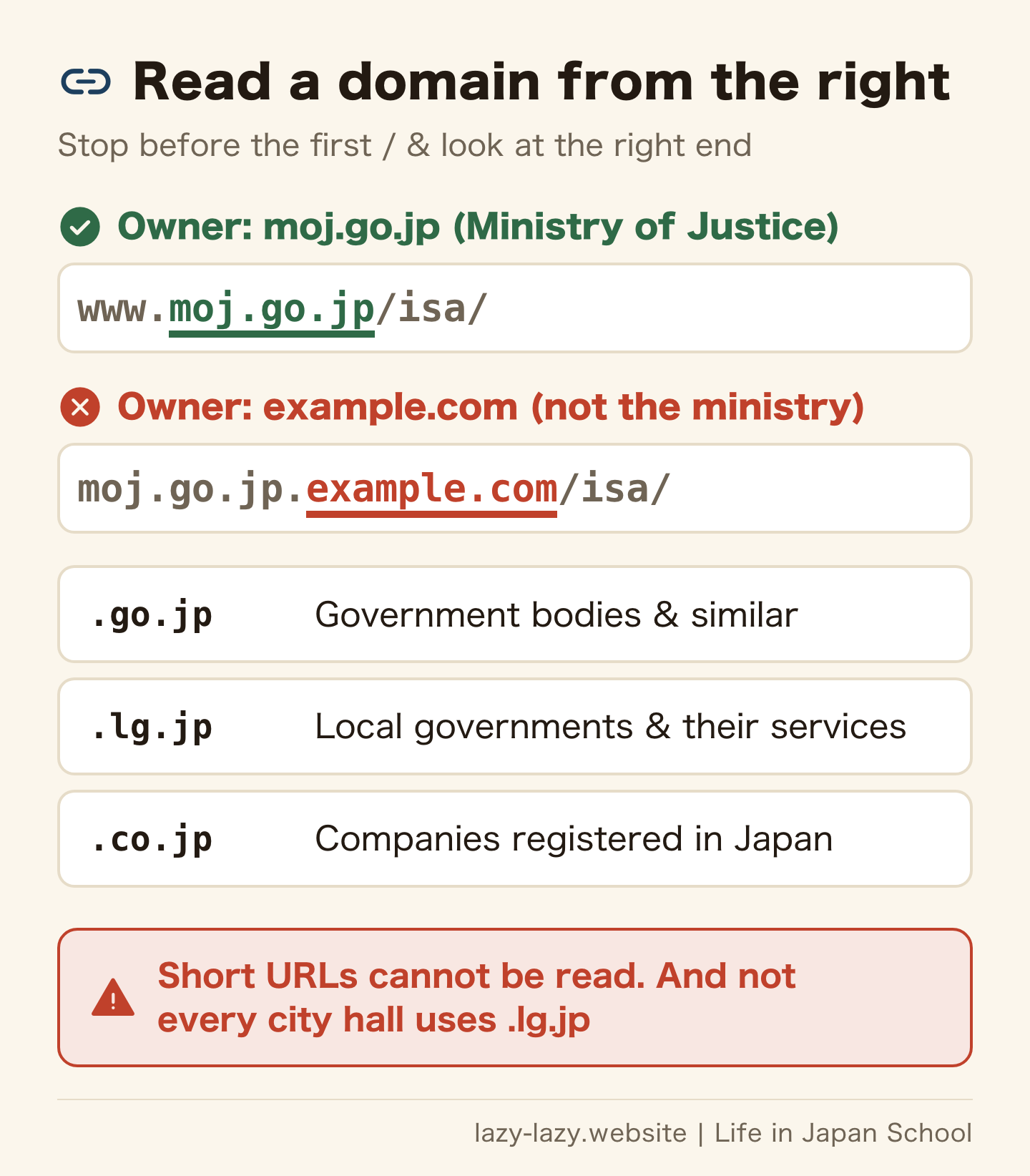
Under JPRS rules, .go.jp can be registered by government bodies, independent administrative agencies and the like, and .lg.jp by local governments and their services. .co.jp is for companies registered in Japan. If the right end really reads like this, you know what kind of owner it is. Having go.jp somewhere in the middle means nothing.
This does not settle everything, for three reasons.
- Not every city hall uses .lg.jp. Sapporo is city.sapporo.jp, Nagoya is city.nagoya.jp and Nishinomiya is nishi.or.jp.
- Many genuine sites end in .com. Yet about 83.3% of the URLs reported in September also ended in .com, and some fake pages sit under the domains of well-known services.
- Texts often use short URLs, and emails can show one address while linking to another. IPA says judging by the URL alone is generally difficult.
Read the domain when you bookmark an official site. It is not a tool for approving a link in a message.
Can’t read Japanese? Using a translation app safely
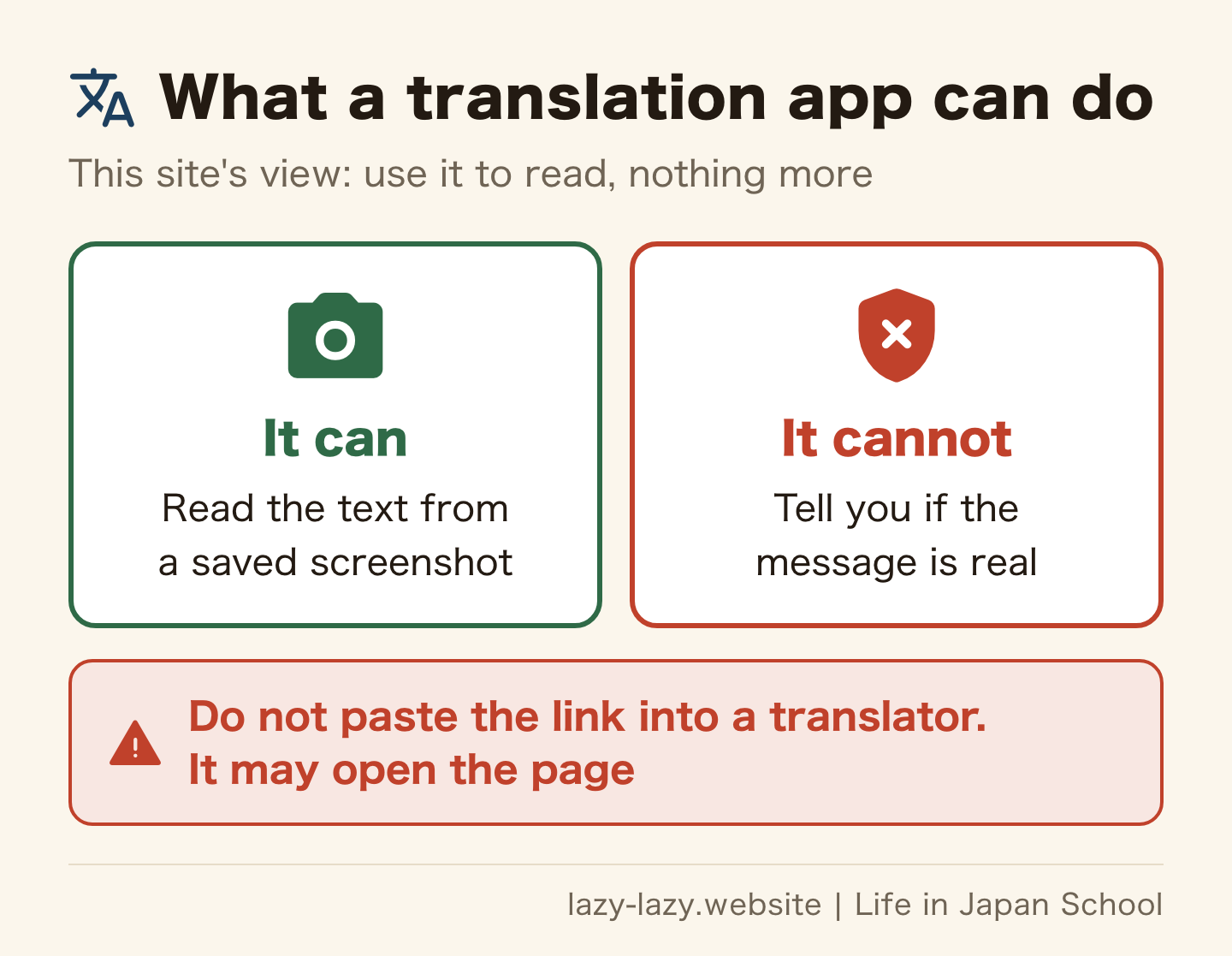
This part is our own view, not an official rule. Save a screenshot and read it with your app’s image translation, so you do not touch the link while selecting text. Do not paste the URL into a translator. Some have a whole-website translation feature, which could open the page for you.
A clean translation proves nothing. Do not let translated words like “urgent” or “seizure” hurry you either: pressure is how this trick works. To check the wording, searching for part of the message can turn up information. If you ask a friend to look, send the screenshot, not the link.
What if you tapped a phishing link? What you entered decides the steps
If you tapped, there is no need to blame yourself. The council notes that slips happen to anyone who is rushed or tired. First, work out what you actually did.
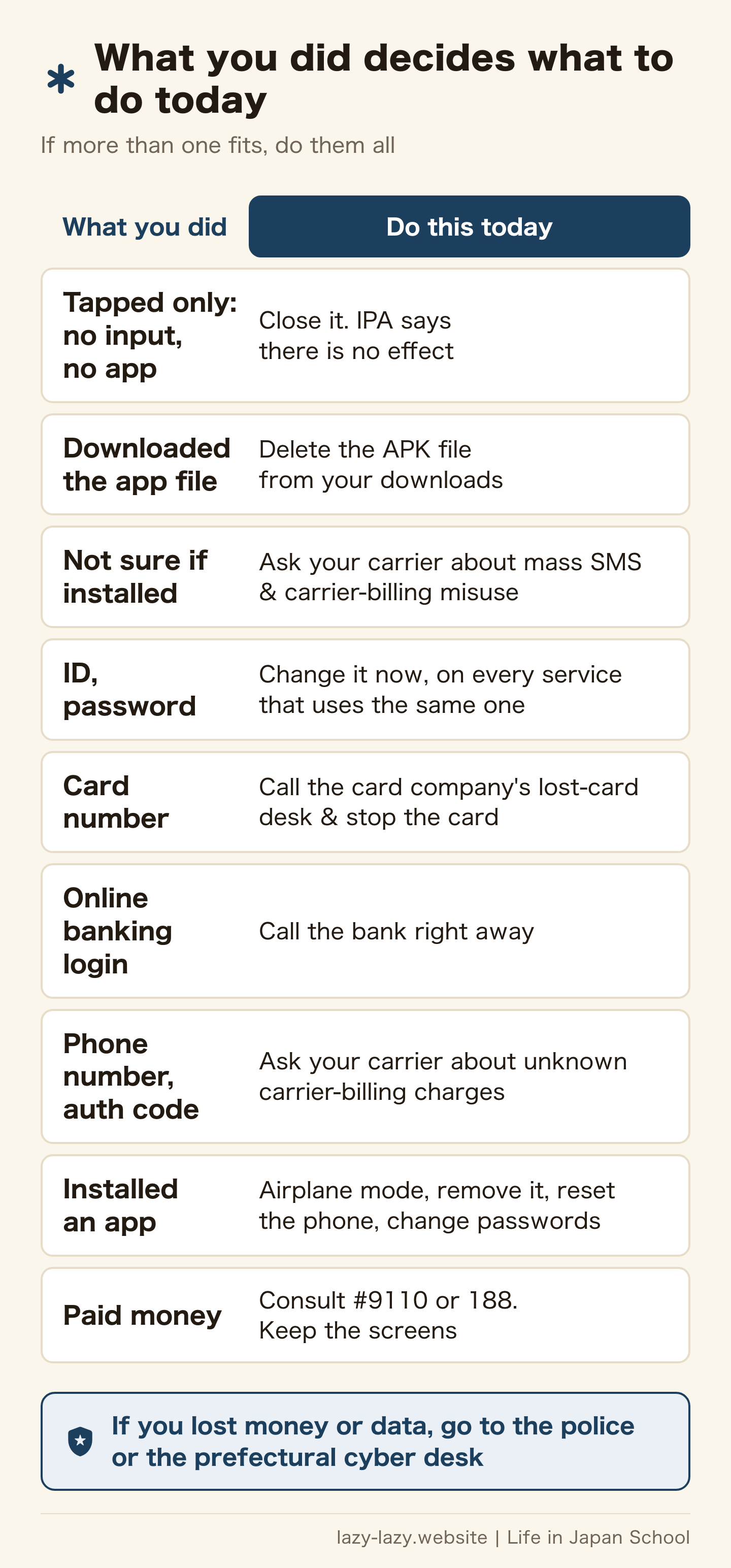
According to IPA guidance from 2022, if you opened a fake site but did nothing and entered nothing, there is no effect. Apps do not install themselves either. IPA guidance on another trick from 2024 also says that just visiting does not lead to damage. Close the page and you are done.
On Android, if you only downloaded the app file, nothing has been installed, so no damage occurs. To be safe, delete the APK file from your downloads folder. If you are not sure whether you installed it, ask your phone company whether mass SMS sending or carrier-billing misuse has appeared.
If you did enter something, it is a different story. You cannot get that information back, so make it unusable. The steps in the table follow council and IPA guidance. Find your card company in this list of lost-card numbers (in Japanese). For a bank, use the contact in its official app or the Japanese Bankers Association list. Even at night, call any desk that is open today.
If you entered your address, date of birth or an ID image, official guidance names no desk that can stop it the way a card can be stopped. We also found no specific Immigration procedure for a leaked residence card or passport image. Consult #9110 or a police station. Afterwards, fake messages that seem to know you may arrive. Run the same 3 steps on them.
Installed a fake app on Android? Airplane mode comes first
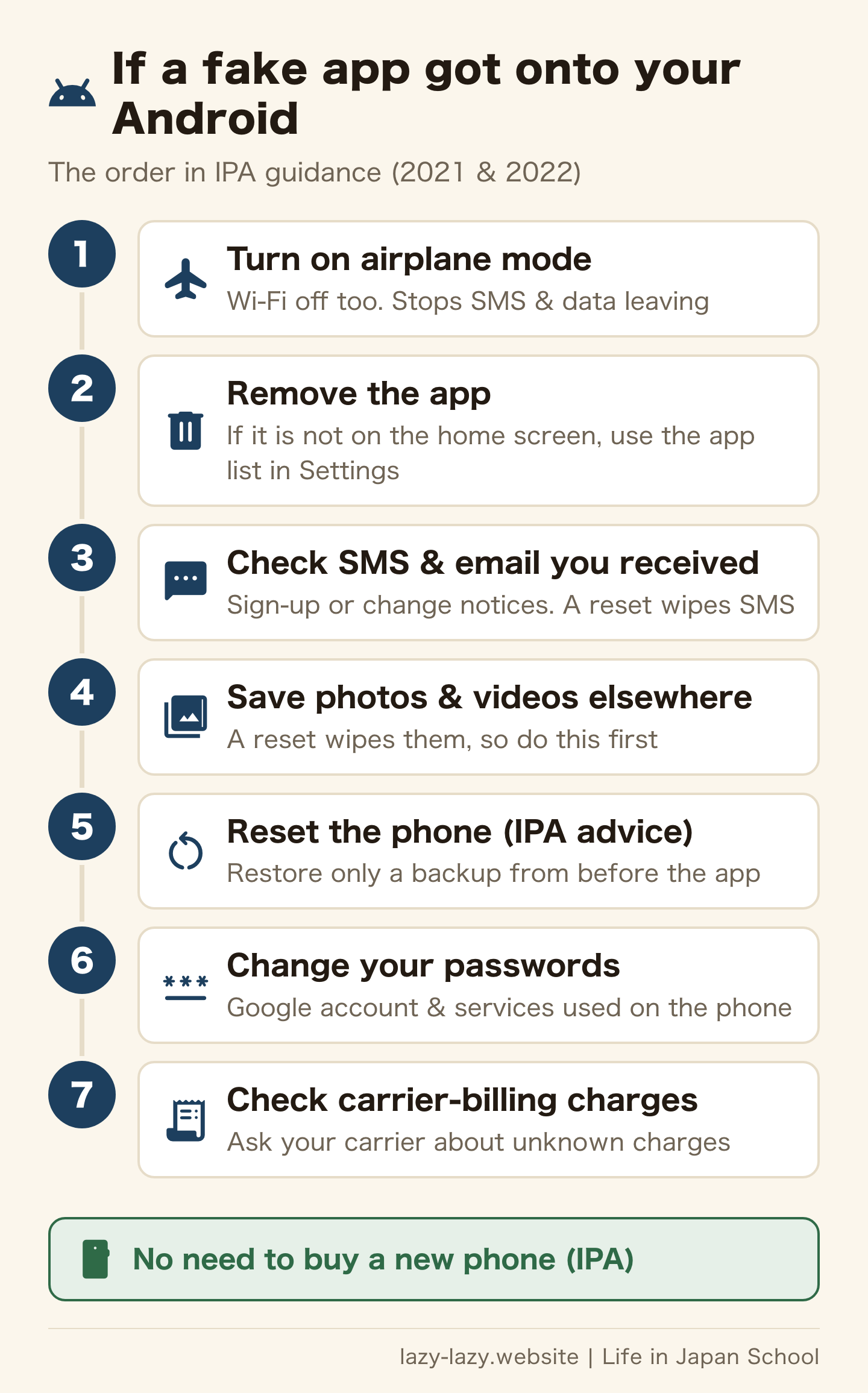
This is the order in IPA’s 2022 guidance and its 2021 guidance. Cutting the connection comes first. Left alone, your phone sends the same fake text to strangers, and the sending charges can land on your bill. Because the app’s full effect on the phone is unknown, IPA recommends a reset, not just removing the app. A reset wipes photos and videos, so save them to other media first. Your phone company can tell you how to reset the phone. You do not need to buy a new one.
Where do you report phishing in Japan, and what does it cost?
| Where | When | Good to know |
|---|---|---|
| #9110 | You are worried and want police advice | Weekdays 8:30 to 17:15 (varies by prefecture). You pay for the call. Not available from rotary-dial lines and some IP phones |
| 188 | Money trouble, or a compensation dispute | Advice is free; you pay for the call. Flat-rate call plans do not cover it |
| Police station / cyber desk | Your information was misused | See the list of prefectural desks and the nationwide online form. File a damage report at a police station |
| IPA security helpdesk | You do not know how to fix your phone | 03-5978-7509. 10:00 to 17:00, closed weekends, holidays and New Year. Free advice; you pay for the call |
| Council of Anti-Phishing Japan | You want to report a fake email or text | Web form or info@antiphishing.jp. For SMS, attach a screenshot |
A report to the council is information that helps protect others. Mail already in your spam folder need not be reported, and the council skips replies except to individual questions. If you entered your details, use the other desks above. You can also send fake-site URLs to the “Phishing 110” service the police point to.
If speaking Japanese worries you, find a desk in your language in our helpline guide. For danger happening now, see how to call 110. Before you consult anyone, save the message, the URL and any billing screens.
Will you get your money back? Ask the bank or card company, and know what is hard to recover
The police note that banks and card companies may have compensation schemes or support desks for illegal transfers and card fraud. We found no single official table of the conditions. If you see a charge you do not recognise, contact that company today.
Money you paid yourself is harder to recover. The council says amounts paid by PayPay after emails posing as resident tax or pension notices are not compensated by PayPay. If you enter a gift card number, its value goes to the other side; consult the issuer or a consumer centre. For bank transfers, and for the next scam that offers to “get your money back”, see the refund section of our scams guide.
Which one are you?
- A message arrived and you have not tapped — do not tap; check in the official app or your bookmark. Today, bookmark your bank, card and phone company.
- You tapped but entered nothing and installed no app — close the page. Today, just see whether the official app shows the same notice.
- You are not sure if you installed an app — today, ask your phone company about mass SMS sending and carrier-billing misuse.
- You entered an ID, card number or bank details — today, change the password and call the card company or bank.
- You installed an app — turn on airplane mode now and remove the app. Today, save your photos, reset the phone, change your passwords and check your carrier-billing charges.
- You paid, or see a charge you do not know — keep the screens. Today, contact that company and consult #9110 or 188.
FAQ
Q. I tapped a link but entered nothing. Am I safe?
IPA says that if you opened a fake site but did nothing and entered nothing, there is no effect, and apps do not install themselves. Close the page, then just check the official app for the same notice. If you only downloaded an app file on Android, delete that file.
Q. Is every text with a link fake?
Not every one. For online Immigration applications made on or after 1 October 2026, a genuine email with a payment link arrives after the examination-completed email. Once you have checked its conditions and your status, pay by following that email. Japan Post excludes texts sent for missed deliveries by Yubinkyoku Bussan Service Co. from its suspicious examples, but does not say whether they carry links. The National Tax Agency sends no SMS notices with URLs. Apart from Immigration’s payment email, skip the link and check in the official app or from your bookmark.
Q. Is a .go.jp URL safe?
If the right end of the domain really is .go.jp, a government body or similar registered it. Having go.jp in the middle means nothing. Short URLs and links that hide their target also exist, so do not tap the link in a message; open your own bookmark.
Q. I entered my card number on a phishing site. What now?
Call your card company’s lost-card desk straight away and stop the card, and have it reissued if needed. If you see unknown charges, consult that company. If you suffered damage, contact a police station or the prefectural cyber desk.
Q. Where do I report fake texts and emails in Japan?
Use the Council of Anti-Phishing Japan’s web form or info@antiphishing.jp. SMS cannot be forwarded, so attach a screenshot to an email. Mail in your spam folder need not be reported. The council does not judge whether a message is real.
Q. I got a strange text from a friend’s number. Is my friend behind it?
Not necessarily. IPA says it may come from the phone of a victim who has a malicious app installed. Do not tap the link, and tell your friend by another route.
Summary
The safest working rule is that fake texts and emails cannot be spotted by looks. Skip the link, go in through the official app or your bookmark, and see whether the same notice is there. These steps work even if you cannot read Japanese.
If you tapped, act on what you entered. Nothing entered and no app: close it. Password: change it. Card or bank: call them. App: airplane mode first. When unsure, consult #9110 and 188.
Official sources: Council of Anti-Phishing Japan, September 2026 report / What is phishing / Reporting phishing / National Police Agency, phishing measures / 2025 cyber threat report / Cyber consultation desks / IPA, fake tax agency SMS and email / IPA, fake delivery and carrier SMS / National Tax Agency, suspicious messages / Ministry of Internal Affairs and Communications, resident tax scam email / Japan Pension Service, suspicious messages / Immigration Services Agency, scams posing as the agency / Online application fees / Suspicious calls and emails / Japan Post, suspicious email / JPRS, types of JP domain. All checked on 7 November 2026. Tricks change, so see the council’s alerts for the latest examples.
Related reading
Found this useful? Share it
Send it to a friend who lives in Japan.
WHO WROTE THIS

mori
Japanese. I read the ministries’ own notices, orders and Q&As in the original, and I start from what my Nepalese and Sri Lankan friends in Japan actually ran into. I do not write about what I have not checked or been told.
What this site can and cannot do →Looking for something else?
You may use the figures in this article, including commercially, if you credit this site with a link. How to use our figures